The Snippet Is the First Test of Your Visibility
A snippet is the promise before the click: how snippets work and how to optimize them in a SERP that's stealing attention
A snippet is a promise. Before the content, before the reading, before the visit, an organic result has to explain why it deserves attention. It does this with a few visible elements: a title link, a description, a URL, a breadcrumb path, sometimes extra data that clarifies what the page is about. In that limited space, the visitor evaluates, compares, and chooses.
For years you could treat that step as a final polish, working mostly on the title tag and meta description. Today, though, Google can also draw on other signals from the page to build the visible result, and AI Overviews and generative modules are changing how the SERP distributes space, answers, and clicks.
Optimizing a snippet means making it clearer why an already-visible URL deserves to be chosen, read, or pulled as a source. The work starts with writing and extends to the page content itself, because an effective promise only holds up when what appears in the SERP matches what the visitor, and in some cases an AI system, can actually use after opening the page.
What a Google snippet is and what it has become
A snippet is the information block that accompanies a search result on Google and previews what the visitor will find on the page.
In English, snippet refers to a small piece, a clipping, a fragment pulled from something larger. That description fits Google’s logic perfectly: it doesn’t show the whole page in SERP, but a fragment selected and reassembled to give the reader a preview of the content that’s readable and understandable before any click happens.
According to Google, snippets are the primary piece of information used to convince a visitor to click on one result instead of another. They represent the first level of interaction between a site and its potential customers, and their basic job is to make a good first impression on people running relevant searches.
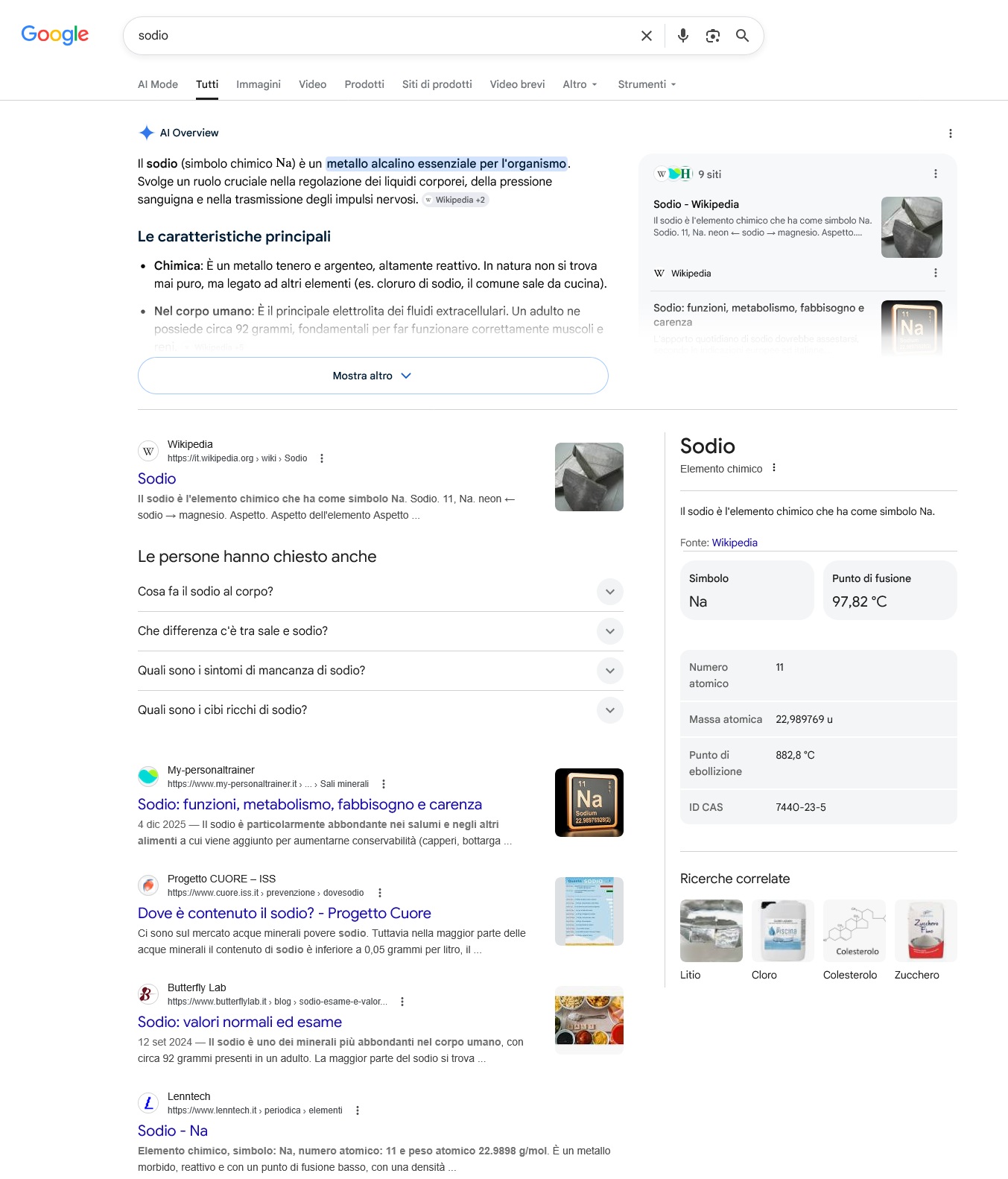
The classic version has three elements: the title link, the clickable headline; the description, which sums up the content in a few lines; and the URL path, often shown as a breadcrumb. On top of these you can get publication dates, thumbnail images, star ratings, prices, availability, sitelinks pointing to internal sections of the site, and event or recipe details when the content makes them available. The more elements that show up, the more vertical space the snippet takes and the more it stands out against the competition.
Technically it’s a block of a few pixels. Strategically it’s the point where ranking turns into choice. Its job is to translate the relevance Google has assigned to the page into something a visitor grasps in a few seconds. A well-ranked URL with a generic, ambiguous, or misaligned snippet loses clicks to competitors even with a good average position. A URL in a less favorable spot, but represented more precisely, can pull a bigger share of clicks than a result ranked above it.
For a long time, snippet optimization came down to two pieces of advice – write a good title tag, optimize the meta description – and both still hold true, but they’re now just the baseline. Above that is a layer where Google assembles the result using different signals from the page, where SERPs are populated with AI Overviews and generative boxes that absorb part of the informational need before any click happens, and where snippet performance needs to be measured as a ratio between visibility, selection, and the quality of the traffic it produces.
The forms a snippet can take: standard, rich, featured, generated
The standard snippet, made up of title, description, and URL, is the most common format in the SERP and the one you can control most consistently, since you’re working directly on the fields and signals Google uses to generate it. It’s also the format under the heaviest pressure in today’s SERP: it sits next to rich results, generative boxes, and ads, and has to earn attention through writing alone.
The rich snippet, or enhanced result, adds information pulled from the structured data on the page. Ratings for reviews and products, prices and availability for eCommerce, durations for recipes and videos are some of the extensions available. Enriched data doesn’t show up automatically: Schema.org markup has to be implemented correctly, the content has to actually provide the information declared, and Google has to consider the result suited to enrichment for that specific query. All three conditions need to be met together, not just one. When it activates, the snippet gains visual real estate, context, and in many cases perceived ranking too. The structural advantage is measurable: pages with rich snippets get, on average, higher CTRs at the same positions compared to a standard result made up of just title and text description, because they take up more vertical space, offer more visual anchor points, and deliver useful information before the click.
The featured snippet is the highlighted box Google shows at the top, pulling a passage from the page it judges best suited to answer the query. Visibility goes up, but the relationship with clicks gets trickier: for some queries, the visitor finds what they need right in the box and never opens the source. Working toward a featured snippet means making an explicit call before you build the content: do you want the page to work as an instant-answer source, accepting that you’ll give up some clicks in exchange for maximum exposure and recognized authority, or as a destination for deeper reading?
AI Overview works like a special featured snippet: an AI-generated summary that pulls together an answer from multiple sources, cites them, and sits at the top of the results page. The difference from a classic featured snippet is one of kind, not just form. The old position zero result pulls a passage from a single page; AI Overview compiles, reworks, and cites multiple sources at once. For our discussion of snippets, what matters most is how it changes the context in which organic results get read: on a query where AI Overview is active, the top classic result slides below the generative summary and competes under new conditions, because part of the information has already been synthesized before the click happens. SEOZoom’s Observatory on the Italian market database, in the May 2026 reading, shows that 71.69% of monitored keywords have an active AI Overview response, peaking at 49.6% for health content, 30.7% for finance, and 26.9% for jobs and education. On YMYL topics, the organic snippet lives in a space where the first thing a user reads is an answer Google has already composed.
The two main snippet signals: title and meta description
The title tag and meta description are the two fields you write directly in the CMS, and they explain what the page offers and how it should be read in the SERP. This is where you can shape how your content gets represented among organic results with the most precision, which makes it the first level of optimization worth working on.
The title is an HTML element that lives in the page head and acts as the document’s primary label for search engines, browsers, social platforms, and any system that needs to interpret its content. In the snippet, it becomes the title link, the clickable headline of the result, carrying the strongest visual weight as users scan the SERP. Google uses it as a key signal for understanding the page and generating the result’s representation. Length, word order, brand use, and specificity are the constraints within which the title has to make the URL’s purpose recognizable. Length is the trickiest part, so pay close attention to title length, since text that runs too long can get truncated in the SERP. As a rule of thumb, aim to stay between 60 and 70 characters at most, though Google actually measures this visually and counts pixels (the limit is 600px).
The meta description is another HTML attribute living in the head, but it does a different job. It’s not a direct ranking factor, though it can influence how a user judges the result before clicking. Google may use it when it considers it a good summary of the page for the query, or it may replace it with a passage from the content that fits the search better. In the snippet, it can become the descriptive line under the title link, with limited space to clarify the page’s scope, value, and what to expect. According to Google, there’s no imposed length limit for the meta description, but in practice the snippets shown in search results get truncated as needed (typically landing somewhere between 145 and 160 characters).
Writing a title and description means compressing a decision into a small space, and the two need to work together. The title guides recognition of the result, the description narrows the uncertainty around the choice. If the title is precise but the description stays generic, part of the promise gets lost. If the description promises something the page doesn’t back up, the click can turn fragile. When the two signals are consistent with each other and with the visible content, Google gets a cleaner representation of the URL, and the user encounters a promise that’s easier to read.
Technical rules help you stay within the SERP’s boundaries, but the real difference comes from editorial choices: which aspect of the page to foreground, which intent to serve, which lever to pull to set the URL apart from other results, and which promise to keep after the click.
How Google builds a snippet from your page’s signals
These aren’t the only materials Google uses to generate the visible snippet, though.
When the system decides a page can be better represented for a specific query, it draws on an entire network of elements living inside and outside the page: the H1, the first paragraph, sections semantically close to the query, anchor text from internal links pointing to the URL, structured data, breadcrumbs from markup, and even og:title tags and other prominent text when they help represent the page better for that query.
The practical point is that the snippet isn’t just the sum of two declared fields. It’s a composite representation, where any on-page element can become raw material for building the visible result. A page with a strong title but a generic H1, a vague opening paragraph, or poorly built internal anchor text gives Google weak material to work with, and ends up with a less solid representation of its own value.
Working on the snippet means thinking of the page as a system of consistent signals, not two isolated fields in the CMS template.
The signals Google can draw on carry different weights, and the hierarchy shifts based on three factors: the quality of the original field (a clean, specific title wins out over an H1 that says the same thing), how closely it matches the query (a passage from within the page that’s closer to the user’s question beats a generic description), and the type of content (on a product page structured data carries a lot of weight, on a guide it carries less). Understanding this logic lets you work toward internal consistency instead of just polishing a single field.
The hierarchy of signals that shape the title link
The direct consequence: the snippet you see in the SERP is not exactly what you wrote, because Google always decides the final form. It reserves the right to rewrite it, partially or completely, to make it match a specific angle of the user’s request.
This practice has intensified in recent years, and today a significant share of the titles shown in the SERP are composed or modified by Google.
The order in which Google looks for alternatives follows a predictable logic. When a page’s title tag is inadequate – too long, too short, built on a repetitive template like “Home – Company Site” applied across hundreds of pages, overloaded with keyword variants repeating the same term, or disconnected from the actual content – the first place Google looks for replacement material is the page’s H1.
If the H1 is also weak or duplicated, the system moves down to lower-level headings, anchor text from internal links pointing to the page (since internal links also tell Google what function you’ve assigned to that page), and the og:title tag, if present.
In some cases, Google may build a title link by combining pieces of these elements. Rewrites aren’t arbitrary, and they aren’t always harmful. Sometimes Google picks an angle that fits the specific query better, and the generated title works better than the original. More often, though, a rewrite is a sign that something on the page isn’t working: signals are conflicting, the title doesn’t represent the content well enough, or the page is ranking for queries different from the ones you targeted.
Reducing the odds of a rewrite comes down to consistency across levels. Use a page-specific title aligned with the H1 without duplicating it exactly, focused on the main query the page targets, and backed up by internal headings and an opening paragraph that confirm the same purpose as the URL. When the title is already the best possible representation of the page and the other signals back it up, Google has fewer reasons to look for alternatives.
What makes a description get “chosen” by Google, and what gets it rejected
A similar logic applies to the description, with one added factor. Google can use the meta description when it considers it a useful summary of the page for that specific query, but it may prefer a passage from the content that’s closer to the search itself.
When that happens, the first block of text on the page effectively becomes a second meta description, written by the content rather than pulled from a CMS field. The criteria Google uses to choose between the two depend on the query and the quality of the original field.
A specific meta description that spells out what the user will find on the page, with a concrete angle, has a better chance of being used, because it gives Google a direct summary of the document’s value. A description built on generic formulas – “Discover all our tips,” “complete and updated guide,” “everything you need to know about…” – is more likely to get discarded, because the system recognizes these formulas as templated boilerplate and looks in the content for something closer to what the user is asking.
There’s one more factor: when Google needs to pull a snippet, not every part of the content carries the same weight. The passages the system prefers are the ones that present information concisely: clear definitions, opening paragraphs that frame the scope of the content, sections that answer a specific question directly. A page that opens with a vague, long introduction with no specific anchors leaves Google with weak material to extract from, and the description that ends up in the SERP reflects that weakness.
The same logic applies to internal headings. A clear, self-contained H2 that spells out the section’s sub-topic and works even read on its own is material Google can use well when summarizing the page’s content. Generic, overly short headings written like paragraph labels are weak material.
The directives you can use to control how snippets appear
Technically, you can also choose to limit or fully block these content previews from showing in the SERP – an edge case, but still possible.
Partly in response to requests from the community, since September 2019 Google has introduced a set of methods that, through settings like the robots meta tag and an HTML attribute, allow for more detailed configuration of the preview content shown for pages, giving you more control over snippet management.
In practice, this means setting specific parameters that let you define how much text, or which part, should be available for snippeting, and to what extent other media should be included in previews.
The robots meta tag directive goes in the <head> of an HTML page, or can be specified through the x-robots-tag HTTP header. There are four methods for controlling a page’s content preview:
- “nosnippet“, the existing option that tells Google not to show any text snippet for the page.
- “max-snippet:[number]“, a newer option to set the maximum length, in characters, of a snippet for the page.
- “max-video-preview:[number]“, another newer option, used to specify a maximum duration in seconds for an animated video preview.
- “max-image-preview:[setting]“, also a newer option, which lets you set a maximum size for the image preview shown on the page, using “none”, “standard” or “large” as values.
These four parameters can also be combined.
The other method for limiting which part of a page is eligible to be shown as a snippet is the HTML attribute “data-nosnippet” on span, div, and section elements, which prevents Google from pulling a section of an HTML page to display inside the text snippet.
Title and description are the first filter for AI engines, too
When an AI engine needs information from the web – because the user’s question is about a topic outside its knowledge, because it needs to verify a recent fact, or because the model has to compare multiple sources to build a reliable answer – it runs a search, gets back a list of candidate documents, and then decides which ones to actually open.
The opening phase has an operational name: click command. Between the list of candidates and the click, the AI applies a filter to the title and description of every result. It only downloads pages that the metadata pre-selection has judged worth reading. For queries with dozens of potential candidates, it opens two, three, at most five.
The choice doesn’t depend on SERP position – the AI doesn’t automatically trust the top result on Google or Bing – but on the snippet’s ability to signal that the page covers a specific aspect, a useful angle, a distinctive contribution compared with other candidates. The selection logic resembles that of a human researcher scanning results quickly and opening only the documents that seem to add something new. The operational difference from a human reader lies in the systematic approach: users choose at a glance, while the AI compares the entire list in a structured way.
What you’ve learned to do to stand out to searchers – specificity in the title, a clear angle in the description, consistency between the two – applies equally to AI pre-selection, but with a lower tolerance for generic snippets. A title that works fine with a distracted user can fail with a system evaluating ten candidates side by side: in AI pre-selection, the more precise page starts ahead. This is where SEO for AI work begins, not with new writing techniques, but with a higher standard applied to what you’re already doing when you write titles and descriptions.
What makes a snippet strong in today’s crowded SERP
Writing effective titles and descriptions works within precise technical constraints – length, syntax, keyword presence, brand use – but it’s mostly a series of editorial choices, and the traits that make a snippet get chosen have become sharper.
Specificity that sets you apart from nearby results, consistency between title and description that removes ambiguity from the promise, alignment with the query’s real intent, and calibration that avoids promising more than the page delivers. These are editorial traits, not technical constraints.
Knowing the useful length of a title doesn’t tell you how to make it specific enough for that SERP; the syntax rules for a description don’t tell you which angle of your page to put front and center.
The title names the topic, but specificity makes the difference
The title link carries most of the weight in representing the page. It’s the first thing users read as they scan the SERP vertically, and it’s often the first element that determines whether a result deserves a closer look. Including the main keyword is good practice, but it doesn’t solve the problem of getting chosen.
What separates a title that gets clicked from one that gets ignored is specificity. A generic title names the topic. A competitive title names the topic and states the angle: the depth of the content, the point of view, the value promise. “Google Snippets: What They Are” describes the subject. “Google Snippets: How to Write Them to Stand Out in the New SERP” already tells the reader what they’ll get by opening the result. The first informs, the second sets itself apart.
You always need to check this in the actual SERP. A title that looks good in the CMS can turn out weak next to competitors that are more precise, more concrete, more aligned with the query’s intent. The question to ask is simple: what concrete reason am I giving the user to pick my result instead of the one above or below it? If the answer doesn’t come through in the title when you compare it with others on the same SERP, you know where to work.
The meta description lives or dies on picking a single angle
The meta description wins or loses on a single decision: which aspect of the page to put front and center within 155-160 characters. It’s an exercise in compression that has little to do with neutral summarizing and a lot to do with editorial selection.
A description that tries to say everything ends up saying nothing specific, and users skip it because it doesn’t stand out from the three or four results next to it. Weak descriptions rely on phrasing that could apply to any content. “Discover all our tips,” “complete and updated guide,” “everything you need to know about…” are grammatically correct, the right length, and neutral in the worst possible way: they describe the category the page belongs to, not the page itself. A description that works instead picks a concrete angle: the most relevant piece of information, the editorial slant, the specific problem the page solves.
On an informational page, the angle can be the scope of the content: “Which factors to weigh before choosing an index fund, with three practical comparison examples” works because it makes clear what the reader will get. On an ecommerce category page, the angle can be the assortment, the selection criteria, the price range. On a service page, it can be the problem addressed in explicit terms. The single rule is that the angle has to be precise enough to speak to someone with that specific need, and calibrated enough not to promise more than the page delivers.
Consistency with the title completes the pair. An informational title paired with a commercial description sends a mixed signal, which Google reads as internal inconsistency and users read as imprecision. A specific title paired with a generic description wastes the advantage the title built. The promise is strong when both elements point in the same direction, speaking to the same query with the same voice.
Checking and measuring the visible snippet
Filling in the title and description in your CMS is the first step in working on your snippet. The second step, just as necessary, is checking what Google is actually showing in the SERP. Without that direct check, you’re optimizing a field that doesn’t always match what the reader sees, and you risk tweaking a title that Google has already replaced without you noticing.
Measurement comes after verification, and depends on it. A snippet works when it turns exposure into clicks, and when those clicks have value. Measuring it on a single level is a shortcut that leads to counterproductive optimizations.
CTR on its own tells you how many users chose the result based on the visible promise, but it doesn’t tell you whether those were the right users, whether they found what they were looking for, or whether the promise matched what the page actually delivered.
An inflated promise raises CTR and lowers the quality of the visit. A description that uses catchy but generic phrasing – “the ultimate guide,” “the secret nobody tells you” – can drive more clicks than a more sober, more precise description. But if the page doesn’t deliver on what the title promised, the visitor leaves within seconds, behavior metrics get worse, and conversions drop. A weak promise makes your traffic less efficient: it increases low-quality visits, weakens the user journey, and reduces the page’s real value. A high CTR built on a weak promise produces a short-term gain and a medium-term loss.
Reading this correctly means combining three levels: what Google is showing in the SERP, what happens before the click, and what happens after. Search Console shows you the first two – query, impressions, clicks, CTR, average position. Analytics shows you the third – sessions, time on page, page views, conversions, value. SEOZoom brings both together inside the Project, changing how you read the data: instead of manually cross-referencing two platforms, you see in the same interface how a URL performs in Search and the value the traffic generates on the site.
Checking the snippet Google is actually showing
Checking the visible snippet starts with the query and ends at the result in the SERP. Search for the relevant query in incognito mode or from a browser without a personalized profile, and look at how your URL is represented.
Compare the title link you see with what’s written in the CMS, and the description with what you entered. If the two match, the writing is what needs revising. If they differ, Google is rewriting the snippet, and the diagnosis shifts to on-page signals. The check should extend to devices and contexts.
The snippet also changes depending on context. For example, mobile and desktop have different amounts of available space, so Google may show shorter versions of the title; it can vary across different SERP languages; and it can differ based on geographic location for queries with local intent.
Manual checking gets complicated when you need to verify large numbers of URLs at once. Google Search Console lets you spot pages with impressions, position, and CTR worth checking; SEOZoom’s SEO Spider lets you isolate duplicate titles, missing meta descriptions, weak template-level patterns, and on-page signals that can trigger recurring rewrites across groups of pages.
An isolated variation doesn’t always call for action. If Google shows a different title for a few days, it could be a test or a temporary adjustment to the query. But if the same rewrite keeps showing up across multiple searches, multiple devices, or several weeks, treat it as stable: you’re not looking at a simple fluctuation but a signal that Google finds something more compelling outside the fields you filled in.
When to step in: reading CTR and position together
The Search Console section of the Project is where every snippet fix should start. A useful reading cross-references three metrics: impressions, average position, and CTR.
A page with high impressions, a position between second and fifth, and a CTR significantly below the expected average for that position is a strong candidate for optimization. The exposure is there, the clicks aren’t – that’s the scenario where working on the snippet can produce measurable results. Reading CTR correctly also means knowing what SERP the result lives in. A low CTR in position 1 might look weak on paper – the historical average was much higher – but if the SERP has an AI Overview above it that’s absorbed part of the informational need, that value might be the best achievable for that query. Measuring a snippet’s performance without looking at the SERP it lives in leads to wrong conclusions and pointless fixes.
SEOZoom’s CTR Anomaly Detector helps you find the most interesting cases systematically. The tool compares actual CTR with the expected CTR for the URL’s average position on that query, flagging the most significant gaps. It doesn’t replace checking the SERP – you should always verify the picture by looking at what Google is actually showing for that search – but it cuts down the time needed to spot the most interesting friction points. The mistake to avoid is optimizing everything with no sense of priority.
Working on a URL with low CTR but position 25 is a waste of effort: the problem isn’t the snippet, it’s the ranking. Working on a URL with high CTR and weak conversions doesn’t mean rewriting the snippet to squeeze out more clicks – it means calibrating the promise to attract the right traffic. Priority should go to URLs where there’s exposure, where the position is good enough to make a click possible, and where there’s business value to capture.
When the problem is the snippet, and when it’s the page
Once you’ve identified the URL to fix, an accurate diagnosis tells you what kind of action to take. If the title link always mirrors the page’s H1 and reads generic, the problem is with how the title tag is written. If the SERP description matches what’s in the CMS but sounds vague, fix the meta description. If the SERP title doesn’t match the CMS version – a sign that Google is rewriting it – the problem runs deeper: there’s a mismatch between title, content, and query, and you need to address the page’s underlying signals.

SEO OnPage in the Project checks the consistency between keyword, URL, title, description, and intent for each individual URL. It gives you an operational read on on-page signals and flags the most significant mismatches between keyword, URL, title, description, content, and intent. SEO Spider extends this check across the whole site: duplicate titles, missing meta descriptions, pages with technical issues, weak template-level signals. On a mid-size site, these two tools are what separates a targeted fix from a systemic one – not every snippet problem needs URL-by-URL work, some get solved by fixing a template. Keyword Studio closes the loop by showing which keywords the domain and individual URLs are visible for. When you group queries around the page that ranks for them, you see which promise the snippet needs to reinforce.
A page getting impressions on informational queries but written with commercial intent needs a title and description realigned to that intent. A page getting impressions on branded queries doesn’t need to stand out – it needs to avoid confusing a visitor who already knows the brand.
Diagnosing a snippet that underperforms
When a URL isn’t bringing in the clicks it should, tweaking the snippet is one of the first things you think of, and one of the worst to follow blindly. Rewriting the title and description without a proper diagnosis means treating symptoms that might not even be the problem, while pulling your attention toward an area that already has negligible impact on your numbers.
The right diagnosis works by elimination: start from the pre-conditions and narrow in on the real weak point, deciding at each step whether it’s worth acting or better to look elsewhere.
- Does the page have enough impressions for you to diagnose it? Below 200-300 monthly impressions, CTR becomes statistically unstable, and any conclusion you draw about the snippet is speculative. If exposure is insufficient, your work doesn’t start with the title – it starts with rankings, topic coverage, and content. You optimize the snippet once you have an impression volume that lets you measure the difference before and after the change.
- Does the average position make a click a realistic outcome? At position 25, CTR stays marginal no matter how you write the title. At position 3-5, with CTR significantly below what’s expected for that position, the snippet becomes your prime suspect. The rule: optimizing title and description makes sense once the page already ranks high enough to make a click possible.
- Is the title link you see in the SERP the one you wrote in the CMS? Search the relevant query and check. If the two match and CTR is low, you have a title-writing problem. If Google is rewriting it, the problem runs deeper: your page’s signals are in conflict, and the fix shifts to the H1, the first paragraph, and the anchor text of internal links. Changing the title in the CMS, in that case, will have limited effect.
- Is the description in the SERP the one you wrote, or a passage pulled from the content? Same logic as the point above, applied to the description. If Google is extracting a fragment of your content, it means Google considers that passage more relevant than the description you wrote. Shift the revision to the page’s first block of text, not the meta field.
- Does your title state a concrete reason to pick that result? Put it next to the other results in the same SERP. If your title could sit on any of the other nine pages in the list, it names the topic but leaves its own difference invisible. Ask yourself directly: what does your page offer that the others don’t, and does that come through in the title?
- Does your description narrow down a specific doubt? An effective description doesn’t summarize the page, it picks an angle. What information does your page offer that others don’t? What problem does it address specifically? What decision-making criteria does it give? If your description uses phrasing that could apply to any content on the same topic, that’s the spot to fix before the title.
- Does the click you get bring in useful traffic? CTR tells you whether the snippet gets chosen. Analytics tells you whether that choice creates value: time on page consistent with the type of content, sensible paths to related pages, conversions if the page has any. If clicks go up after a rewrite but sessions, conversions, and average time get worse, you’ve built a promise the content can’t back up. The metric isn’t click volume, it’s the match between the click and what happens next.
- Does your page deliver on what the snippet promises? The last check is the most uncomfortable one: open the page as if you were the visitor who just clicked your result. Does the promise you made in the SERP hold up? Does the content answer the need stated in the title right away, or does it force the visitor to scroll to find the answer? A page that doesn’t deliver on its snippet’s promise raises your CTR while lowering the quality of the visit – a problem no title rewrite can fix.


 Verified reviews on Trustpilot