Ecommerce filters: which ones deserve a page and which to block from crawlers
Every ecommerce filter creates a URL for crawlers. Here's which searches deserve a page, where to stop crawling, and how to test the rules.
Half of the crawling issues Google ran into in 2025 came from faceted navigation. Every time you set up a filter on your online store that narrows the catalog by brand, color, or size, you almost always create a new URL. And to figure out that a set of URLs isn’t useful, a crawler first has to download a good chunk of them.
Why does this matter? On a large catalog, the time Googlebot spends on combinations can delay discovery of new product pages, and it makes your server work for nothing. Ecommerce platforms decide in bulk: PrestaShop 9 blocks every filtered list, WooCommerce blocks none of them, and Shopify blocks sorting in robots.txt while leaving the single filter crawlable.
Filters, though, serve the people buying. A filtered list with its own URL can outrank generic categories in search results, and from there reach AI Overviews and ChatGPT answers.
Google’s guidance says there’s often no reason to let crawlers scan filtered lists, without explaining which ones deserve to be indexed. The platform decides without looking at actual searches. Starting from those searches is on you: a page for the searches your assortment can support, and filtered URLs that only serve navigation kept out of crawling.
What Is Faceted Navigation
Faceted navigation is the filter system customers use to narrow a product list by combining brand, color, size, and other attributes. Each characteristic used as a filter is a facet, and the values are the options it offers, like Nike, black, or size 38, often with a product count next to each. After each choice the list gets shorter and the counts recalculate based on what’s left. Usually two values of the same facet combine, black or blue, while different facets intersect, black and size 38. Faceted navigation shows up on category pages and among internal search results.
A category is a spot you decide on in your catalog tree: shoes, running shoes, women’s running shoes. It has its own page, a link from the menu, and a name chosen for whoever searches for it, and a product sits there because you put it there. A facet, instead, cuts across categories: black applies to running shoes just as it does to jackets, and it combines with other attributes. A category exists before the customer arrives; a filtered list is born from their choice.

The filter works on screen, for the customer. Behind that choice, the store almost always leaves behind a URL nobody designed: /scarpe-running/?colore=nero it’s the list of black running shoes, and that URL reopens the list without touching a filter. What reaches a crawler is the URL, not the filter, and it’s that URL Google can index and show for a search.
The shape of the URL changes from one platform to another. With parameters, values get appended after the question mark, and if the platform writes them in click order, the same list can end up with two URLs, ?colore=nero&taglia=38 o ?taglia=38&colore=nero depending on whether the customer starts from color or size. With values in the path, /scarpe-running/nero/38/, the filtered list looks like a subcategory and only works with segments in a fixed order. With the fragment, #colore=nero, which Google generally ignores, or with a script that updates products without touching the URL, the address is still the category as far as Google is concerned, and the filtered list exists neither as a copy nor as a page.
Sorting and pagination also change the URL, without narrowing the list. Resorting by price or by newest reshuffles the same products, and the resulting URL is a copy. Splitting the list into pages, instead, spreads different products across different URLs, and the second page doesn’t copy the first.
Where a Crawler Finds Filters
A crawler only learns the URL of a filtered list if it finds it written somewhere: in the sitemap, on another site, or, inside the store, in a link. Googlebot follows elements <a> with the URL in the attribute href; checkboxes and dropdown menus, which respond to a click, aren’t links to it. In MediaWorld’s notebook category, in October, we counted 946 links, and only 3 contained the filter parameter: the filters were checkboxes, and ?brand=ASUS it worked for the customer without the category exposing it to a crawler.
Links that a script adds after the page loads reach Googlebot only after rendering, a step that Google can skip on pages with noindex or a non-200 response. OpenAI and Anthropic, on the other hand, don’t disclose whether GPTBot and ClaudeBot execute JavaScript: a filter you want them to reach needs its link already written into the HTML that comes from the server. Opening the category’s source code in your browser shows you which filters a crawler finds even without running JavaScript.
Searches That Deserve a Page
In Google’s guidance on faceted navigation, the choice of which filters to have indexed has disappeared. In 2014, in a blog post, Google asked site owners to go parameter by parameter and decide which ones were useful to searchers, using the example of a candy store: yes to a filter for sour flavor, because people search for sour gummies, no to a price range filter. The guide from December 2024, which replaced that post, leaves only two options: block the filter URLs from crawling, or make them clean and accept the cost. It also adds that there’s often no good reason to let filtered lists be crawled, since product pages and a single unfiltered list of all products are enough. The guide no longer says how to choose what to keep open.
Search results point to which lists deserve a page. For “black women’s running shoes,” in the SERP SEOZoom recorded in October, the top four results were lists already narrowed to black: New Balance, adidas, Nike, and Zalando. The full categories from Intersport and Decathlon, with no color filter, ranked fifth and seventh. This is the case the guide covers when it talks about making faceted URLs indexable: its instructions are technical, and choosing which searches to open up is up to the store.
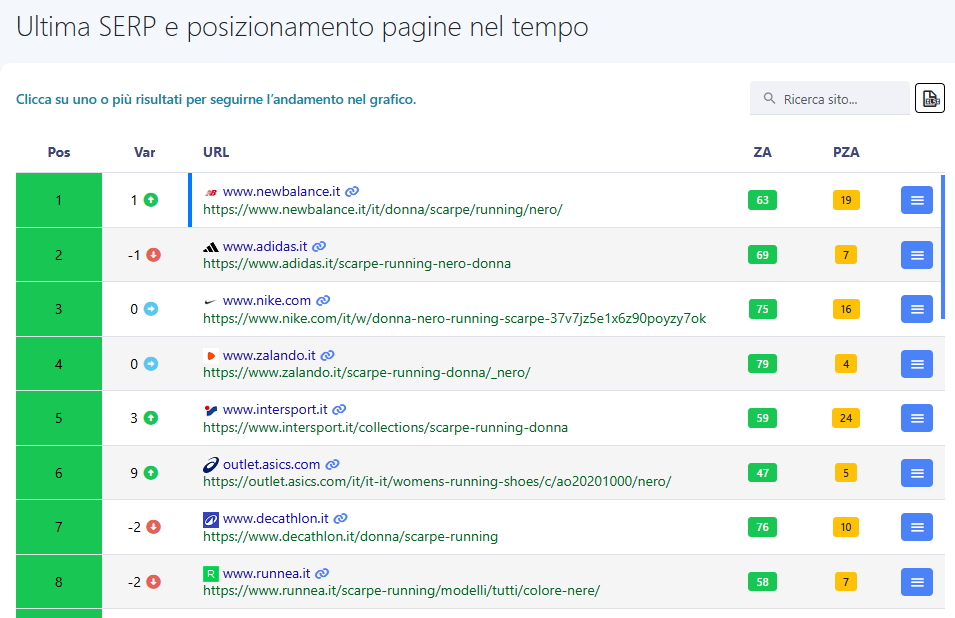
The choice matters outside the SERP, too. ChatGPT search rewrites the question into one or more queries and sends them to the search providers it works with, as OpenAI’s documentation explains. For us, the foundation of AEO, the work behind the answers assistants build by searching the web, is still showing up in Search: an assistant doing a live search often starts from traditional engines, Google above all, whose index feeds AI Overview and AI Mode. A narrow list with an indexed URL can be retrieved and cited; a filter combination with no address leaves the assistant with only the category page or a single product page. And to appear among the sources for AI Overview and AI Mode, a page also has to be indexed and eligible to show a snippet, as explained in Google’s documentation on AI features.
On your store, searches like these are already landing on some pages, and the Performance report in Search Console tells you which ones: it normally counts impressions and clicks on the URL Google has chosen as canonical. Filter the queries that contain a color or a brand and see where they land. If a filtered list shows up among the pages, Google is already indexing it and sending it searches of its own. A category that collects queries with a color, on the other hand, answers narrow questions with a broad list, leaving the customer to redo with filters the choice they’d already typed into Google. These are searches you already have, and the first ones to consider for a dedicated page.
Searches your site doesn’t show up for stay invisible in Search Console. To find them, start from the attributes your products actually have and the words customers type into the site’s internal search engine, then check which pages win on Google for each one. In our Keyword Analysis, the “Last SERP and page rankings over time” grid shows the ranking URLs query by query, and from the address, or by opening the page when the address isn’t enough, you can tell a narrow list apart from a full category or a single product page. A ranking position tells you where a page shows up, but only Search Console measures the clicks it gets.
We open a dedicated page where the SERP already shows narrow lists, because there a dedicated page is the kind of result Google chooses, and where the assortment holds up over time: a combination held together by a handful of clearance items turns into a 404 once the stock runs out, losing the rankings it had earned.
With full categories topping the SERP, a dedicated page has to earn its spot with a list your category doesn’t already offer. And if your category already answers that search well, with clicks in Search Console and the right products up top, a new page would only compete with it, risking cannibalization. With unclear signals, we leave the search to the category and track its performance in Search Console: an open page is an ongoing commitment, and there’s always time to open one later, once the data is clearer.
The Filter Promoted to a Page
Nike and Zalando both turned a filter into a page, in two different ways. Nike’s URL ends with four codes, one per filter, for running, women, black, and shoes: remove a filter from the page and its code disappears from the URL. The page is indexable, with a canonical pointing to itself. Zalando starts from the women’s running shoes category and narrows it to black with a filter, /scarpe-running-donna/_nero/, with its own H1, “Black Women’s Running Shoes,” and here too the canonical points to itself.
Behind both approaches are the same requirements, and the platform has to allow for them. The combination resolves to a single URL, however the customer gets there: parameters in a fixed order, separated by &, or segments of the path in the same order. It links a permanent link <a href> from a page that crawlers visit, like the category page. It has a title and H1 that name the selection, a few lines to help users navigate between products, a canonical pointing to itself, and a spot in the sitemap, which Google uses to gather URLs to show in results.
There’s still the comparison with the parent category: two pages that Google judges identical or very similar end up under a single canonical. What sets them apart are the search terms in the title and H1, plus the internal links coming from the category page. URL Inspection, in Search Console, tells you which of the two Google picked: if it points to the parent, the pages are usually still too similar, or the signals are too weak.
Pages Outside the Filter Module
A filter only becomes a page where the platform allows it. On a module that won’t let a filtered listing have its own title and canonical, or on PrestaShop 9, which blocks this by default, the page for the search gets created alongside the filter, and the filter stays with the customer. On laptops, as of October, MediaWorld kept the two objects separate this way. To narrow the listing, customers had the brand facet, which for ASUS led to ?brand=ASUS, set to noindex. Google, instead, for “notebook asus” found /it/brand/asus/notebook, an indexable page with the H1 “ASUS Notebook,” built and linked like a category page. Thanks to the noindex on the filter, the two URLs don’t compete for the same search.
Where the choice is open, you can manage the filter promoted to a page with the same module that generates it, while a separate page takes more work but keeps the URL for Google apart from the filter URLs. You can build these pages one by one or, if you have many searches to cover, generate them by rules from the catalog attributes.
Navigation-Only URLs
For every other filtered listing, Google’s recommendation applies: they stay with the customer, and their URLs come off the crawlers’ path. Each listing repeats the links for filters and its own pagination, and starting from a single category, a crawler can keep moving from combination to combination almost endlessly, passing through reordered and empty listings too. In the Search Off the Record podcast, Gary Illyes discussed Google’s report on the crawling issues it ran into in 2025: half of them involve faceted navigation.
We start with sorting, which only produces copies, with price ranges, which follow price lists and, with a free-range slider, write a URL for every interval, and with multi-value selections within the same facet, like black and blue together, which multiply the combinations even without changing the attribute. What stays open, though, is the unfiltered category with all its pagination: every page has its own URL, a canonical pointing to itself, and a <a href> to the next page, and it takes Googlebot all the way to the listings the first page doesn’t show. One check comes before you block anything: in Search Console, none of these URLs should already be getting their own search traffic.
Of the tools Google offered in 2014, few remain. The URL Parameters tool in Search Console, where sites declared how to handle each parameter, was shut down in 2022; the crawl-rate limiter was removed, along with the separate host with minimal crawling that the post once suggested, and Google no longer uses rel=prev/next for pagination. Exclusion today runs entirely through the site.
A Disallow rule in robots.txt stops crawlers that respect it before the request is even made, and a filter that only lives in the fragment doesn’t even produce a URL to request. A theme that doesn’t write links for a facet cuts off its main path to those URLs, but an address found elsewhere remains crawlable. Over time, canonical tags and nofollow deliver less than robots.txt. Google only reads the canonical after downloading the page, and over time it may reduce visits to non-canonical versions; nofollow sits on the link, but it only works if every link pointing to that URL carries it. Noindex removes the page from the index but doesn’t save crawl budget, because Google still has to download the page to read the tag.
How Much They Weigh on Your Site
Server logs measure the weight of these URLs. Once you keep only verified Googlebot requests, you can count how many go to URLs with parameters, which parameters come up most, and what response code they get, then compare them against requests for product pages and categories. Search Console’s crawl stats split Googlebot visits by response code, file type, and purpose, and work well as a first look.
Google doesn’t penalize anyone for duplicate pages: a certain amount of duplicate content is normal, doesn’t violate its spam policies, and Google picks which version to show on its own. The cost is the crawl budget spent downloading them. A combination with no matching products is a different case: with a 200 status code and a “no results” message, Google can classify it as a soft 404 and keep requesting it. For empty combinations that remain crawlable, Google’s faceted navigation guidance calls for a 404 error on the URL itself, with no redirect, including for repeated filters, nonsensical combinations, and pages beyond the last page of pagination. For Google, a 404 is a strong signal to stay away from that URL, while a URL blocked by robots.txt stays in the crawl queue much longer.
Google writes its crawl budget guide for three types of sites: those with over a million pages that change every week, those with over ten thousand that change every day, or sites with many URLs stuck in “Discovered, currently not indexed.” These thresholds are estimates, Google says so itself, and below them, an up-to-date sitemap and a regular check of the Page Indexing report are enough. Copies and empty combinations, though, show up with every filter even in a small catalog, and the same report shows you where they end up: among duplicates, among soft 404s, or under “Indexed, though blocked by robots.txt.”
Read Google’s two guides together. The one on faceted navigation says that crawl budget spent on filters slows down the discovery of new content. The one on crawl budget distinguishes crawl capacity, meaning what the server can handle, from crawl demand, meaning how much Google wants to crawl, and warns that an inventory full of useless URLs wastes a lot of crawl time. It adds, though, that the crawl budget freed up with robots.txt doesn’t automatically shift to other pages, unless Google is already at the site’s capacity limit. Closing off filters eliminates the waste and lightens the load on your server, but it doesn’t guarantee that product pages get crawled sooner.
The Rule in robots.txt
With parameters, the name is what a rule latches onto. On a catalog that filters by color using a parameter called colore, a made-up name, the rule looks like this:
User-agent: *
Disallow: /*?*colore=
Googlebot reads the asterisk as any sequence of characters, including an empty one. The line therefore blocks /scarpe-running/?colore=nero, its second page /scarpe-running/?colore=nero&page=2 e /scarpe-running/?taglia=38&colore=nero, but also an unrelated parameter like sottocolore=. Still crawlable are /scarpe-running/?page=2 and a separately built page like /scarpe-running/nere/. With values placed in the path instead of a parameter, there’s no name to hook onto, and a rule struggles to tell a filter apart from an actual category.
The same rule catches the color listing you’ve decided to index. To reopen it you need an Allow line with its URL, which for Google takes precedence over the Disallow because it’s longer and covers every address that starts the same way, including /scarpe-running/?colore=nero&taglia=38 e /scarpe-running/?colore=nero&ordina=prezzo. With the $ at the end, Allow: /scarpe-running/?colore=nero$, the line applies only to that exact address, and pagination for that listing stays blocked: it’s the same format Google uses in its guide’s example, allow: /*?products=all$. Alternatively, give the listing an address the rule doesn’t touch, like the URL of a separate page. The order of work is fixed: first choose the pages, then write the rules and a sitemap that contains only the pages you chose.
Filtered URLs Google has already indexed need one extra step. The noindex comes first, since Googlebot only reads it by downloading the page; a Disallow added right away would hide the noindex from it, and the URL, if other pages link to it, could stay in the results. Add the Disallow once the pages are out.
Groups for AI Crawlers
robots.txt is split into groups, and a crawler that follows the standard applies only the group with its own name or, failing that, the group with the asterisk. The rules in the two groups don’t add up: that’s what RFC 9309 establishes, and Google’s crawlers comply with it. It follows that a group named after an AI crawler with just the line Allow: / opens up all the filters you had closed off for everyone else.
Decathlon, in the file we read in October, listed ClaudeBot near the end with just the line Crawl-delay: 5, which asks it to slow down. Under the standard, that line doesn’t close a group, so ClaudeBot’s name falls into the next group, the file’s last User-agent: * , which excludes only one gift card page. The filter exclusions written higher up for other crawlers never reach ClaudeBot. Only the site’s server logs can tell you whether ClaudeBot actually downloads filter URLs.
A dedicated group is useful, for instance, to separate the two crawlers that OpenAI distinguishes: OAI-SearchBot, which surfaces sites in ChatGPT search, and GPTBot, which collects content for training. Opening the first and closing the second is a legitimate choice, as long as you copy the filter exclusions into that group too. Sportler, in the lines dedicated to Google, repeated the general rules in full. At h-brands, instead, 42 AI crawlers sat in one group that excluded the filter parameter but not sorting, which stayed crawlable for them.
Default Platform Settings
Four widely used ecommerce platforms, Shopify, PrestaShop, WooCommerce, and Magento, come with their own choices on filter links, canonicals, noindex, and robots.txt, and every rule you add builds on top of them. We looked at these in the code and documentation of the October 2026 versions; for Shopify, which documents little about its default behavior, we also checked the robots.txt and the pages of a store, dorelan.com.
| Platform | Filter URL | Filter Links | Canonical and Noindex on the Filtered List | Robots.txt on Filters |
|---|---|---|---|---|
| Shopify, Dawn Theme | ?filter.v.option.color=… |
checkboxes in a form; links only to remove active filters | canonical to the collection and no noindex on dorelan.com | sorting (sort_by) and tag combinations are blocked, as Shopify documents; on dorelan.com, two filters combined are also blocked, with the single filter crawlable |
| PrestaShop 9, ps_facetedsearch module | q parameter, with facets and values |
nofollow links | canonical to the category; noindex on filtered and resorted lists | Disallow: /*?q= and Disallow: /*&q= in the file written at installation and regenerated by the admin panel |
| WooCommerce 11 | ?filter_color=… |
nofollow links in the classic filter widget | no canonical on archives from WordPress and WooCommerce; no noindex | no rule on filters |
| Magento / Adobe Commerce 2.4 | parameter with the attribute code, such as ?color=… |
nofollow links | category canonical off by default and, if enabled, pointing to the category; no noindex | no rule at installation; the panel’s default instructions include Disallow: /*? |
PrestaShop 9 follows Google’s advice to the letter, and does it twice: robots.txt blocks URLs with q, and the filtered page still carries the noindex and canonical pointing to the category. For Googlebot, the Disallow wins, since Google can’t read the noindex of a URL it doesn’t download, and a filtered listing linked from other pages can stay in the index with no content, in the “Indexed, though blocked by robots.txt” state. For searches that deserve a page, the fastest route is to build one next to the filter. If your store comes from 8.2, which added neither the noindex nor the Disallow on q, the update leaves the old robots.txt in place and adds the noindex: filtered listings already in the index drop out, and only then should you regenerate robots.txt from the dashboard.
WooCommerce and Magento do the opposite: they leave every filtered listing indexable and put only a nofollow on filter links, which Google generally doesn’t follow and which WooCommerce writes into the classic widget. There, the work is mostly about closing things off. Magento’s dashboard, with “Reset To Defaults,” loads instructions that err in the opposite direction: Disallow: /*? it blocks every URL with a question mark, ?p=2 pagination included, and Googlebot loses the path to product pages beyond the first page.
Shopify, with the Dawn theme, renders filters as form checkboxes, with links only to remove active filters: within the collection, the theme gives crawlers no link to filtered listings. On dorelan.com, selecting a single value stayed crawlable, but with a canonical pointing to the collection, telling Google to show the parent page as the version to display. To change robots.txt, Shopify provides the robots.txt.liquid template, but treats it as a customization its support team won’t help with, and warns that, used incorrectly, it can cost you all your traffic.
Your Catalog in the SEO Spider
The theme, app, and customizations change your starting point, so to see the result on your own catalog we use our SEO Spider, which moves like a crawler: it starts from a URL and follows links. We run it on a category and, with the tabs under its crawl path, turn on “Crawl only the starting URL folder.” Once the crawl finishes, in the SEO Elements → URL panel, the Parameters entry collects the parameterized URLs the Spider reached: alongside pagination, sorting, and any tracking parameters, you’ll find the filters the theme turned into links. For each one you get the response code, the number of clicks from the homepage (Clicks from Home), and the Blocked by Robots column, which flags URLs already excluded by the robots.txt.
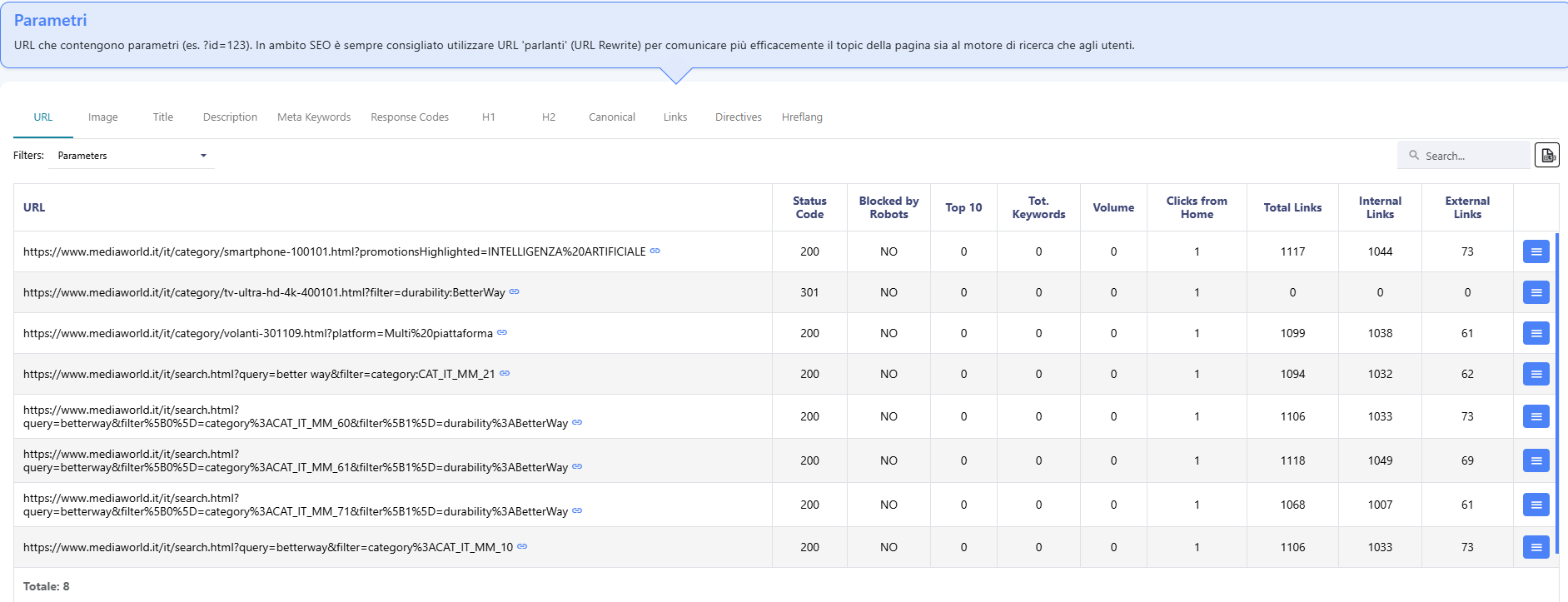
By default the Spider, like Googlebot usually does, doesn’t follow nofollow links, and on platforms that apply nofollow to filters, the “Ignore nofollow directive” option also shows you the URLs those links would open. The crawl goes up to 8 levels deep and, by default, stops at 750 pages, a limit you can raise; a URL missing from the list can still reach Google through other links.
With the Spider you can also test a rule before publishing it, and testing matters because a rule that blocks too much doesn’t throw errors. The robots.txt report in Search Console tells you whether Google reads the file and whether there are syntax errors; the product pages the rule removes from crawling, reachable only through the filters, show up later in the Page Indexing report. Run two crawls of the same category with the same settings, and in the second one enter the names of the parameters to block in the “Exclude certain pages from the crawl” field, without slashes or quotation marks; then compare the URLs reached. That field, though, discards any address containing the text you entered: “price” also excludes a category with “price” in its path, which the rule /*?*prezzo= would let through.
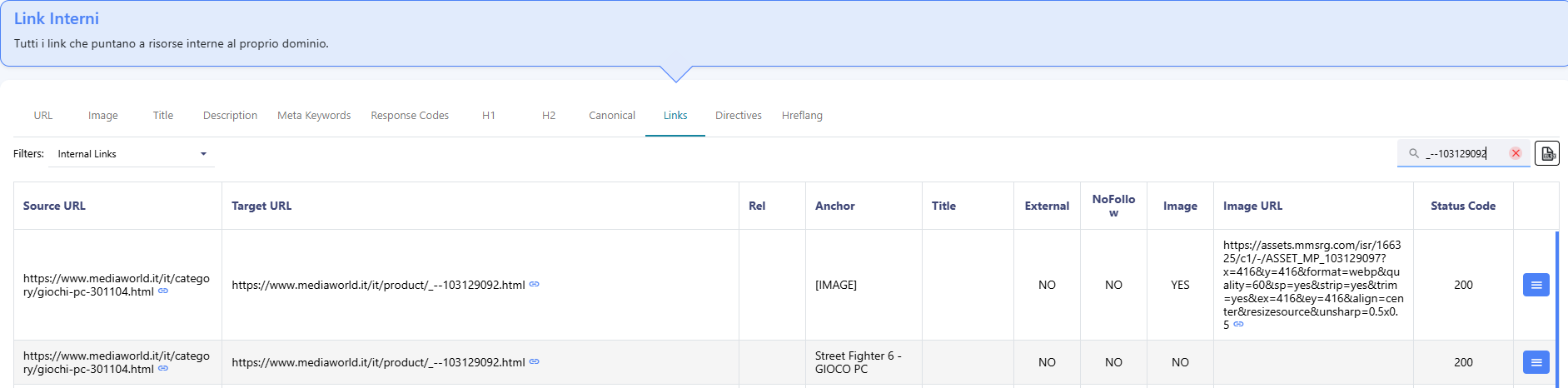
What matters is a product page that shows up in the first crawl but not in the second. If its URL contains the excluded text, the field removed it, not the rule; if the second crawl stopped at the page limit, the comparison doesn’t hold. In every other case, open the Links view from the first crawl, apply the Internal Links filter, and search for the product page’s URL: the Source URL column lists the pages that link to it. If they’re all addresses with the filter parameter, then within the crawled scope that page is reachable only from there, and before you publish the rules it needs a link from the category page or its pagination. The limit is still the crawl’s own: a link from a page the Spider didn’t reach won’t show up in that list.
Once the rules are live, check the open pages and the blocked addresses in two different places. Search Console tells you whether the former are getting indexed and for which queries; the logs tell you whether Googlebot’s requests to the latter are dropping, and how much AI crawlers are requesting in the meantime.


 Verified reviews on Trustpilot