Every Search Opens Possibilities. Keyword Research Decides Which Ones to Pursue
Useful keyword research doesn't produce lists: it decides which queries to cover, how many pages you need, and what to check after publishing
You call it solar panel system. Your competitor writes solar panel systems, plural. Your customers search for solar panels, and they ask ChatGPT whether it’s worth putting panels on the roof of a house with four people who are out all day.
The thing is the same, what they’re telling you isn’t. Solar panel system is your word, solar panel systems is what your competitor uses, solar panels is the name the market uses. The question put to the assistant carries a house, a family, a habit, and a financial question that don’t show up in the other three phrasings.
Keyword research exists to read that gap. It reconstructs what the people you want to reach actually want, starting from the traces they leave when they search, on Google, in AI assistants, on Amazon, on YouTube, and it leads you to decide which of those needs to serve, where, and with what. The keyword is the easiest trace to measure. The real work lies in what it leaves out.
What keyword research is
Keyword research is the work of finding out how people search for what concerns your business, then deciding which of those searches are worth pursuing, with what content, and on which pages of your site.
What you end up with are decisions: which content to write from scratch, which page to rebuild because it’s answering the query poorly, which pages to merge because they’re competing for the same visitors, which topic to drop because it isn’t bringing in customers. Sometimes, as anyone who’s had to explain it to a client knows, the right move is to do nothing. The list of keywords you gather along the way is raw material for thinking it through. On its own, it won’t help you decide anything.

This work demands judgment, not just good software, because of how a keyword actually works. Even when people share a similar problem, they rarely phrase it the same way: one adds a detail, another uses a synonym, a third misspells a word. The keyword you see in the tool is the form under which all these variants get grouped, and it’s valuable because it lets you gauge demand before you touch a piece of content. But reducing a query to a single string strips away almost everything the person who typed it had in mind: the problem they were trying to solve, the situation they were in, the point they’d reached in making a decision. What’s left is the object, and not much else.
Today, much of your job is about recovering what got lost. Keywords are still your anchor, because they’re the part of the need you can observe, count, and track over time, but how you use them has changed. For years they were the target to hit. Now they’re a signal, and under each one is a need you have to trace back to, whether the searcher expresses it on Google, in an AI assistant, or on whatever other platform they turn to for information.
Research and analysis ask opposite things of you
The traditional process of keyword research was fairly standardized, regardless of the tool you used: you type in the term you’re interested in, wait a few minutes, and get a list, usually sorted by estimated search volume, with other data alongside it.
That’s the moment where, often without realizing it, your job changes. You scroll down the rows, look at volume, difficulty, and cost per click, and start to discard and keep. What you’re doing is keyword analysis: evaluating phrasings someone already gathered using signals that estimate their weight and competitiveness. It’s a necessary step, but it treats an open question as already settled: who decided that those, and only those, were the phrasings worth evaluating?
The answer: the seed term you started from, and the sort order by volume, which pushes the most-searched words to the top and buries everything else at the bottom. What ends up at the bottom is exactly what tells you the most about who’s searching: the long queries, written by people with a specific problem. Questions asked to AI assistants don’t even make it into that list, because no database tracks them precisely.
Between collection and evaluation, what counts as a good result flips. While you’re collecting, a good result means widening the net: you find phrasings, doubts, and needs you hadn’t anticipated, and every item discarded too soon is lost material. While you’re evaluating, it means narrowing down: you exclude, you rank, you set priorities, and every unnecessary addition becomes noise. Skip the collection step and you end up measuring, with great precision, the vocabulary you already had on day one. Skip the evaluation step and you hand over a long list that nobody, not even you, really knows how to use.
The decisions it shapes beyond the blog
The first use that comes to mind is content planning, but the same information guides decisions that have little to do with articles. The name you give a category on your ecommerce site works when it matches how customers search for those products, rather than matching your internal catalog’s naming. When you write a landing page or a product page, knowing which doubts come up before a purchase tells you what to put on the page and in what order. If you also run paid campaigns, those same keywords become your bids, and cost per click, which in organic search signals value, becomes an expense you have to justify there.
Then there’s a use that didn’t exist until recently. You choose which prompts to monitor in AI assistants using the same approach: starting from the real needs of people who might buy from you, not from the questions you’d like to be asked. Monitoring itself you hand off to AI Prompt Tracker, which queries assistants with the prompts you’ve chosen and tracks, over time, how they mention you and which sources they cite. Deciding what to put under observation is still keyword research. It just happens downstream.
From a string to repeat to a signal to interpret
For a long time, keyword research had a simpler goal. Search engines matched strings of text: a page showed up if it contained the words typed in, in the same form, and the job of an SEO was to find the exact phrasing and repeat it in the spots the engine read. Singular and plural counted as two separate searches, and anyone who wanted to cover both ended up publishing two nearly identical pages.
Google dropped that model a long time ago. Its systems work on meaning, recognizing synonyms and variants, understanding when two phrases that share no common term are actually asking the same question. Its guidance on optimizing for AI-based search features says so explicitly: you don’t need a separate page for every variant, and mass-producing them to manipulate results counts as large-scale content abuse.
Along with meaning, Google’s systems weigh the purpose of the search. The same words, typed by two different people, can be asking for completely different things, and search intent decides which type of answer the engine considers correct: an explanation, a comparison, a product page to buy from, a nearby address. On the same keyword, content that answers the wrong intent loses to a weaker piece that answers the right one.
What’s left from that era is the keyword as the unit you work with before publishing. What’s gone is everything built on top of it: search volume as the only starting criterion, research done once at the start of a project, a keyword repeated throughout the text until the engine noticed.
The question nobody counts
Since ChatGPT and Gemini became part of how people search, you’ve probably heard this argument: keyword research has had its day, because people no longer type two words into a box, they describe their problem to an assistant. That describes what’s happening accurately, but it lands on the wrong conclusion, because it confuses what a market is asking for with the part that tools have always been able to see.
Any keyword database, including ours, is built on searches that recur with some frequency, and have been around long enough to estimate a volume. What’s left out: searches that are new, niche jargon, names of products just launched, and above all the long requests where someone describes their situation instead of naming an object. The language of an industry generates new phrases every day, and a database only logs them once they become frequent enough to count. Measured demand has always been a slice of the real demand, even before AI assistants came along.
In your day-to-day work, that missing slice has a specific shape: a row with zero volume, or a search the tool doesn’t even recognize. It’s tempting to toss it out, since there’s no number next to it to justify the time spent. Yet those rows often describe your customer better than a clean keyword does, because they contain the problem, the constraint, the doubt that drove the search in the first place.
The zero, meanwhile, should be read for what it is: the tool has no estimate, and in most cases the demand behind that row is small. Small, though, doesn’t mean worthless, and deciding whether it’s worth the work comes down to the same criteria as any measured keyword: how close the need is to what you sell, who’s occupying the SERP, how many other searches point to the same problem. One isolated row carries little weight; if you find twenty more like it, you’ve got a topic. You can still keep a row like that on your radar: in your projects add even the keywords the database doesn’t recognize, data shows up as soon as the crawls process them, and from there you track them like any other.
Every platform holds a piece of the need
With AI assistants, the slice of demand that nobody counts has gotten bigger, because search now spreads across multiple platforms. Before a major decision, the people you’re trying to reach search Google with a few words, describe their situation to ChatGPT, watch YouTube to see how a product works, read reviews on Amazon from people who already bought it, ask Reddit what people who’ve been through it think. This is distributed search, and each platform holds onto a fragment of the need that the others lose: the prompt holds the personal situation, the review holds the objection, the comment under a video holds the practical doubt, often in the buyer’s exact words.
Covering all of them, though, is out of reach for almost anyone. What you need instead is to widen the sources you check when you’re piecing together a need, picking them based on where your audience actually looks for information: for a technical product that might be YouTube, for a local service it’s reviews, for an expensive, carefully considered purchase, increasingly, an AI assistant. When the decision runs through an assistant, the comparison between alternatives often happens inside the answer itself, and whoever lands on your site has already made up most of their mind.
AI does keyword research on behalf of your customers
Picture someone asking ChatGPT which wireless alarm system makes sense for a standalone house. The question doesn’t reach a search engine in the form it was typed. If the assistant decides it needs information from the web, it rewrites the question first: the ChatGPT search guide explains that the request is typically turned into one or more targeted searches. Google describes the same mechanism in its documentation on Search’s AI features: AI Overviews and AI Mode can use a technique called query fan-out, which fires off multiple related searches across different subtopics and sources to build the answer.
Look closely at what happens in that step, and you recognize the same work you used to do with a keyword research tool: start from a need and translate it into the phrasings that cover it. The difference is that now, in a growing share of cases, a machine does this job, deciding on its own which angles to explore and which words to use.
Every search that leads to an answer has two authors. The person with the problem expresses it using whatever vocabulary and level of detail comes naturally to them. The assistant, when it decides to search, breaks that problem down into a set of keywords following its own logic. Your content might get found by the person searching and ignored by the assistant, or the other way around. If you only look at human searches, you miss the part of the path the machine covers on its own.
The person searching and the assistant ultimately meet on keywords. The searches the assistant generates are still text queries sent to a search engine, and the answer gets built from the pages that engine returns. That’s why SEO for AI rests on SEO: if your page doesn’t show up among the results for those searches, it has no way into the answer, no matter how well it’s written. Inside Google, this link is explicit: generative features pull from the Search index, filter it through the same ranking and quality systems as always, and a page only gets considered if it’s already indexed and eligible to appear among regular results. AI search is still SEO, with no proprietary markup and no dedicated files.
Reading the machine’s searches too works in your favor, given how assistants pick their sources. Each sub-search returns its own list of pages. Our hypothesis, drawn from the mechanism itself rather than a direct measurement, is that a page able to show up in multiple lists, because it covers several angles of the same need, has more chances of being used than a page built around a single keyword, one that competes on just one branch.
A searcher names the object, an assistant searches its circumstances
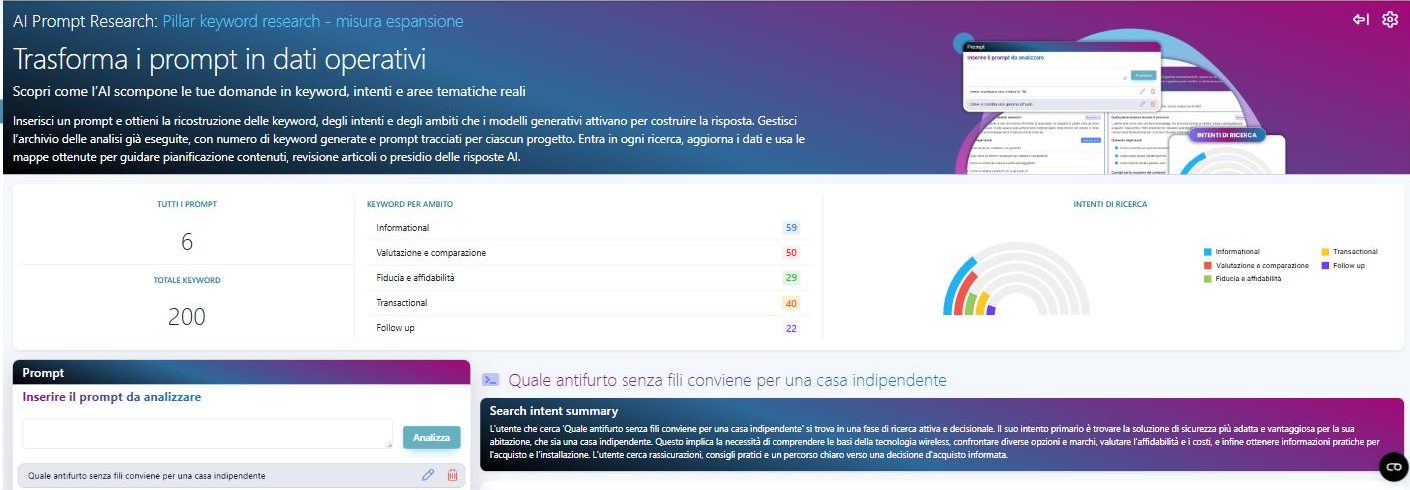
With the security system query, the gap shows up right away. Expand “wireless security system” in a keyword research tool and the highest-volume searches all name the object: kits, systems, wireless setups, home alarms. In fact, a different word than the starting one tops the list, alarm, the name the market actually uses for that product. There are no questions in the top rows, and no search mentions standalone houses, multiple floors, or pets at home.
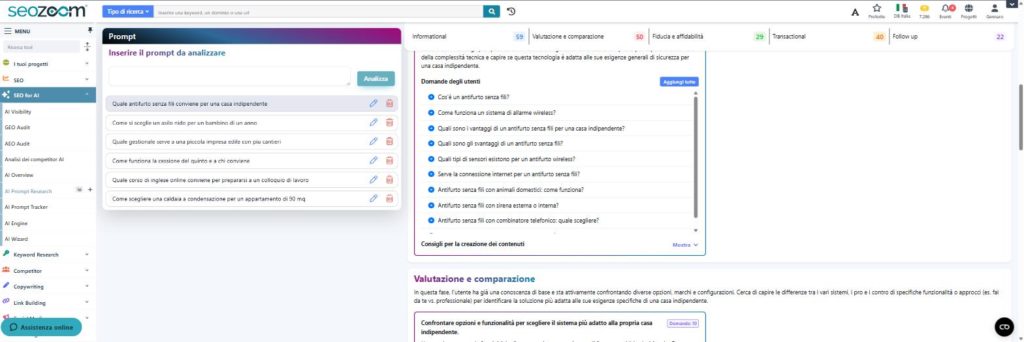
Running the same question whole through AI Prompt Research, which reconstructs the sub-searches an assistant might use to cover a prompt, widens the scope. What emerges includes how the system works with a dog or cat in the house, how easily a burglar could disable it, how well it holds up in a multi-story home, a comparison between DIY and professional installation, total cost, tax deductions, and insurance discounts. Searching the database for the phrasings you’d derive from this, almost all come back with no volume. The exception is the security system tax deduction: people searching for it never write “wireless” at all, a term an expansion starting from the product name would never reach.
The same need leaves different traces. People name the object, in words that don’t always match yours, while breaking down the question touches on aspects that come before the choice is made, most of which don’t show up in search volumes at all. The keyword research you need today reads all of them.
You can’t predict the machine’s strings, but you can predict the facets
Fan-out already has a measurable scale. Peec AI analyzed 20 million searches generated by ChatGPT between October 2025 and January 2026, finding an average of 2.3 to 2.8 searches per prompt. Nectiv, running its own test in August 2026, found an average of 7.6. The two numbers don’t add up and don’t contradict each other either: the periods, samples, and methods differ. What you can take away is the order of magnitude, along with the direction things are moving.
These same studies help clarify the limits of what you can actually know. Some questions never trigger a search at all, because the assistant answers using knowledge the model already has, and in those cases there’s no keyword to capture. When a search does happen, the exact strings stay unpredictable: in Peec’s data, their average length doubled over the observed period, and in Nectiv’s data many contain the operator site:, a way of querying the engine that users rarely use themselves. These don’t show up in tool search volumes either, since those estimates describe what people type.
With reasonable confidence, you can reconstruct the facets of a need: cost, comparison with alternatives, limitations, trust in the provider, the question that comes right after the first answer. These are the points a wide spread of searches keeps coming back to, whichever path the assistant takes. Machine queries tend to land in what we call mid-level queries, where “level” refers to position relative to the need, not length: more specific than the term naming the object, less tied to the single case the prompt came from.
| Human searches | Machine searches | |
|---|---|---|
| Who writes them | The person, in their own vocabulary | The AI assistant, when it decides to search the web |
| How you find them | Estimated volumes, SERPs, Search Console | Hypotheses reconstructed from prompts, checked against SERPs and cited sources |
| What stays stable | The recurring phrasings of a need | The facets of a need, more than individual strings |
You measure human searches directly. Machine searches, you reconstruct and then verify. The sub-searches AI Prompt Research gives you, broken down by area, are hypotheses generated by a model. They become actual working material once you check them against keywords with real search volume, against SERPs, and against the sources assistants actually cite.
A seed keyword gives back the vocabulary you already have
The term you feed into an expansion tool decides almost everything you’ll see afterward. That’s the seed, and nine times out of ten it’s the name you use for what you sell. From there, the tool pulls up searches containing that term and stops: anyone with the same problem who phrases it differently doesn’t show up, and nothing in the list you get warns you that it’s missing.
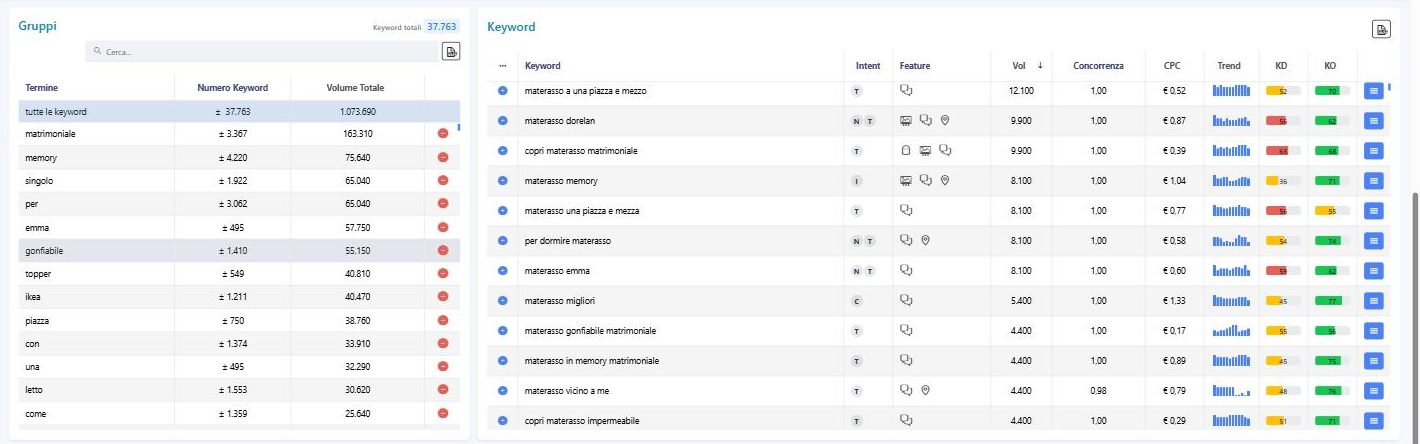
With “mattress” the effect is obvious. Sort the expansion by volume and the top rows are filled with competing brands, accessories, and spelling variants of the same query, without a single question. The doubts that actually come with the purchase, which model to choose for back pain, how much it makes sense to spend, what’s the difference between memory foam and springs, sit much lower or don’t appear at all, because the people asking them often don’t use the term you started from. The list isn’t wrong: it’s an accurate picture of searches containing “mattress”, which is only part of the demand.
That’s why the starting term needs to be paired with sources that don’t depend on your own vocabulary. The most overlooked one is inside your company. Support emails and tickets collect questions written in the customer’s own words; sales people know the objections that stall a deal; reviews, yours and your competitors’, show what customers appreciate and what they complain about. That material, which no catalog contains, often produces the best seeds.
Collecting this material works better if, before you open any source, you already know how much work you can sustain: how many pieces of content you can publish and then keep updated. Without that limit, at some point you’ll start cutting things out of fatigue instead of judgment. While you’re collecting, though, it pays to hold off on judging: a phrasing that looks off-topic at first glance might reveal a need you hadn’t anticipated, and the moment to choose comes later.
Someone else has already written the words you don’t have
Questions shift the focus from the name of the product to the problem it solves, and you can collect them from the “People also ask” boxes or through question-based search. Searches with the same intent express what someone needs without containing your term, and they’re the most direct way to discover vocabulary you don’t already have.
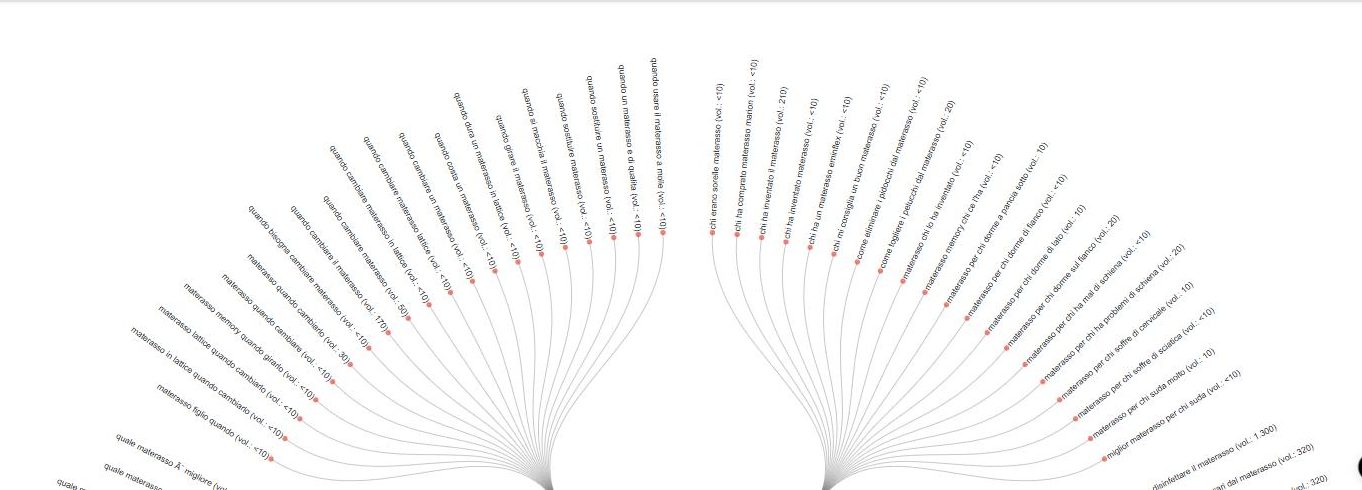
Collecting these one source at a time is the slowest approach. Keyword Infinity expands the term you start from and returns the related searches already sorted: the “Questions, prepositions and actions” tab groups them under question words, prepositions, and verbs, and the filters let you isolate the longer ones, where the searcher’s context shows up more clearly. Next to almost all of them you’ll find a minimum search volume, which is exactly the part of demand that a list sorted by raw numbers never shows you.
 Keyword Suggest pulls in bulk the autocomplete suggestions from Google and YouTube, the same ones you’d otherwise read one by one, and it matters most when your audience researches by watching videos. The prompts a customer would type into an assistant bring into the mix the personal context that short keywords lose along the way.
Part of the work has already been done by your competitors, and they leave it in plain sight. The searches they rank for tell you what a piece of content needs to cover to hold its own; the ones none of them rank for only tell you they’re not there, and it’s the SERP that tells open space apart from a topic nobody cares about. Start from a competitor’s domain and you get its keywords, the pages ranking for them, and the ones your site doesn’t show up for at all: that’s the material competitor analysis starts with.
On your site, Google has already told you which words work
When you’re working on a project with a few years of content behind it, the research doesn’t start from zero. The starting point is an inventory of what you’ve published and how the search engine interprets it. Search Console lists, for each URL, the searches your site has appeared for. Matching them against your content shows which needs you already serve, with which page, and where two pages answer the same question. What Google gives you, though, stops at your own site: impressions, clicks, average position, with no comparison to the market around you. Connect it to a SEOZoom project and every row expands: alongside those numbers you get the search volume for that query, its seasonality, its intent, and the SERP features occupying it, including AI Overviews.
From there the work moves through views built to answer the questions keyword research raises: which pages are competing for the same search, where the ratio between impressions and clicks is off from what you’d expect, which searches have the widest room for growth.
At that point, searching for new phrasings changes purpose. It helps you spot needs none of your pages cover and ones covered poorly, and figure out whether an existing page needs a rewrite before you write another one next to it. On a mature site, many of the most useful decisions concern pages that already exist: rewriting them, merging them, redrawing their boundaries more clearly. The Opportunity Finder scans a domain’s pages and puts at the top the ones underperforming relative to their potential, with an estimate of the room still left to capture. It’s still an estimate, one to read alongside real impression data, and it helps you decide where to start.
A topic’s weight shows up at the group level
Finish the collection and you’re staring at hundreds of phrasings, tempting you to evaluate each one on its own volume. That’s how you lose the information that matters most. Many rows, taken individually, have modest volumes; combine all the ones expressing the same need, and the group often beats out the big keyword that topped the list. With the expansion of “mattress,” for example, memory foam related phrasings are countless and nearly all small, but added together they reach a volume none of them hinted at alone.
Thinking in groups reshuffles your priorities, and not always in favor of the most searched topics. A high volume keyword can turn out to be an isolated case with no real need behind it, while a topic with no standout rows can represent a broad, scattered demand that a single well built piece of content can fully serve. It’s also the most concrete way to give the long tail its due: rare searches that mean little on their own and a lot once you catch them together.
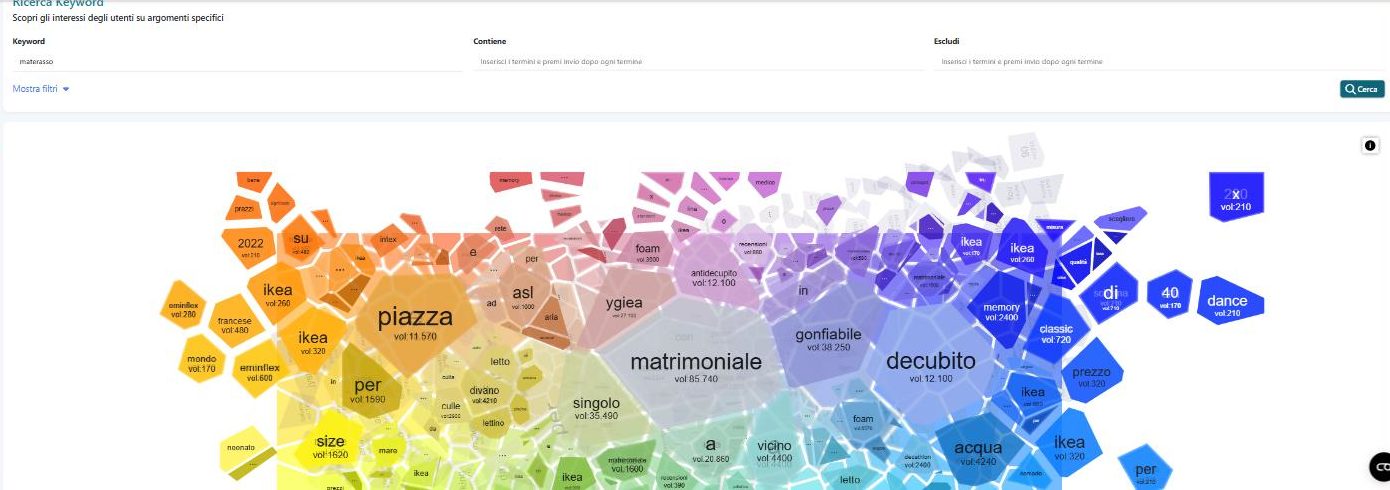
The group forms around the need, and shared words are just a clue. The Keyword Groups panel in Infinity clusters phrasings by recurring terms and gives you a solid starting point to review by hand, since it can lump together “price” and “how it works” for the same product, which belong to different stages of the decision. To see what gravitates around a topic, Audience Interest arranges related searches in a cell map instead of a column, surfacing nearby subtopics that a list sorted by volume tends to hide.
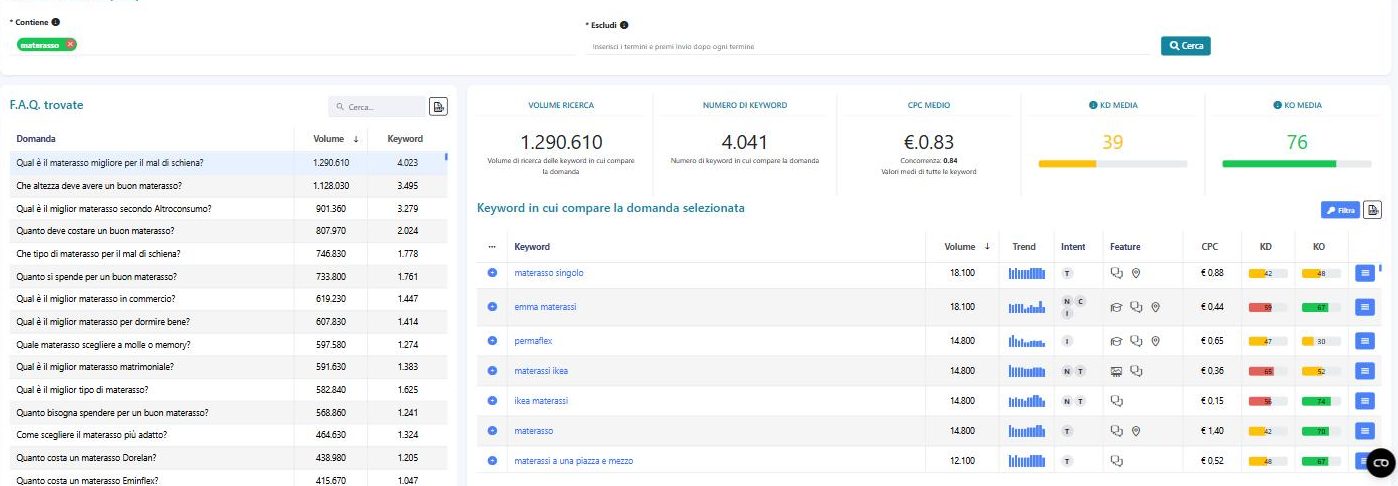
Within each group, questions deserve separate attention. The ones that come up across many different keywords carry more weight, since they cut across the whole topic instead of belonging to a single phrasing, and Question Explorer pulls together questions from the “People also ask” boxes and shows you at a glance, next to each one, how many keywords trigger it. Sticking with mattresses, the question about which model to choose for back pain comes up across a huge number of different searches, tying the product to a symptom that never showed up in the seed expansion.
A group also has a trend over time. Average annual volume flattens out the spikes: a demand concentrated in just a few months barely registers in the average and hits hard when it actually arrives, and content published once the season has already started has little time to get found. Looking at seasonality month by month, alongside volume, tells you when to work on a topic, not just whether to work on it.
A group also reveals intent, the reason behind the search. The classic categories (informational, navigational, commercial, transactional) help you get oriented, and they show up on the SERP more than in the words themselves: if Google displays guides, the search is asking for an explanation; if it displays product pages, it’s asking for a purchase; if it mixes both, the group holds together different needs and will eventually need to be split apart.
Where a searcher stands in their decision
Inside a buying journey, intent labels narrow down until they stop telling you anything useful. “Fixed or variable rate mortgage,” “mortgage bank reviews,” and “mortgage payment calculator” all fall somewhere between commercial and transactional, yet each one calls for a different page: a comparison, a judgment on the lenders, a calculation tool.
What makes the difference is the stage of the decision, and the stage shapes the words people use, the expected answer format, and the kind of proof that convinces them. Early on, searchers use generic terms, since they don’t yet know exactly what to ask for, and need a clear explanation with no offers mixed in. Once they start comparing, words like “best,” “difference,” “worth it” show up, and what convinces them is a comparison built around a case similar to their own.
Further along comes the question of who to trust, built on reviews, firsthand experiences, company names, and here what matters is proof a business can’t write about itself. Close to purchase, searches turn to prices, quotes, availability, often with a location attached, and the page needs to clear away the last obstacles. After the purchase, people search again when something doesn’t go as expected, as someone’s customer.
When you put together a content brief, it helps to note, alongside the keyword, which stage you’re writing it for. Answer a comparison search with a contact form, and you’ve arrived too early: whoever opened that page wanted a comparison, and they’ll likely go look for it somewhere else.
The SERP before the number
Volume, difficulty, and cost per click tell you how much a keyword is searched, how contested it is, and how much someone is willing to pay to show up for it. None of these numbers tell you whether that keyword is relevant to you, and that’s what you need to figure out before investing any time in it.
Relevance comes down to the need behind the search. “Inflatable mattress” contains the term from your catalog, but if you sell orthopedic mattresses, it speaks to someone looking for something completely different; “back pain on waking up” doesn’t contain it at all, yet it describes exactly the problem your product promises to solve. A phrasing is relevant to you when whoever wrote it is moving toward a choice you can be part of.
Relevance determines whether you compete in a broad market or serve a niche. Facing a large need, you can try to compete where the strongest players operate, or you can fully serve a narrower segment that’s close to what you sell. The second path makes sense when your site can’t hold up against the competition in the broader market, and when that segment is large enough to justify the work. Indaga settore shows you which niches actually exist in a given area, breaking a topic down into its component themes, with the most relevant keywords for each one, the ones already exploited by everyone, the ones where potential remains, and the questions that come up again and again.
You estimate the value of a need by how close it sits to a decision: intent, the moment of choice, the connection to what you offer. Cost per click is a useful clue, because it tells you someone considers that search profitable enough to pay for it. Traffic estimates hold up poorly as a basis, since they start from volume and rankings to arrive at hypothetical visits, and a good ranking alone guarantees no clicks.
You check all of this in a place no metric can replace: the search results page. Volume tells you how often a phrase gets searched and says nothing about how much space is left for organic results, or about what type of site Google considers the right answer. On many commercial searches, ads, product listings, question boxes, and sometimes an AI Overview appear above and alongside the organic links. And in categories where a lot gets sold, it’s common for none of the first three open spots to hold editorial content at all, just manufacturers, resellers, and marketplaces.
A SERP like that reveals what the number hides. The available space is smaller than the volume suggests, and a guide, however good, enters a competition where Google has already picked a different kind of answer. You find this out by opening the results before deciding, and that costs you far less than discovering it after writing content for space that doesn’t exist.
The same difficulty score, two different games
When you open a SERP, the first question is whether you can break in. Difficulty indicators answer that without making you open every single one, drawing on whoever already occupies that first page. Keyword Difficulty runs from 0 to 100 on a logarithmic scale and estimates how hard it is to rank high, weighing the Zoom Authority of the domains present; Keyword Opportunity measures how optimized their content is. Both describe the keyword and who holds it, and say nothing about your site.
Two keywords with the same difficulty score can hide completely different competitive situations. In one SERP, the top positions belong to domains with very high authority that divide up nearly all the space. In the other, among the top results there’s also a site with much lower authority and just one page on the topic, that got there because it answers better than the rest. The value is the same, but only the small site that made it to the top gives you proof that a well-made page can break in even without a strong domain behind it.
That’s why no single difficulty threshold works for everyone. The comparison that matters is between your site’s strength and that of whoever occupies that specific SERP, page by page as well as domain by domain: even where the domains are strong, the top pages can be weak, and Page Zoom Authority (PZA), which SEOZoom shows alongside the Zoom Authority of every result, reveals where there’s room to break in.
The same word, in a different place or a different catalog
A keyword doesn’t have just one SERP. If the same search brings up the map with local businesses, Google is reading local intent, and you need to research where your customers actually are: with phrasings that include city and neighborhood names, and with ones that don’t mention them but still get local results. On that ground the competition plays out within a few miles, and local SEO adds signals to your pages that don’t carry weight elsewhere, from the business listing to reviews from people who’ve actually been there.
The same mechanism repeats across countries and languages. A translated keyword carries over your own vocabulary into another language, while the target market often has its own specific names for the same things, with SERPs built differently. You need to redo the research for the target market, using its own databases and its own questions, before you even build the language versions and declare them to Google with the hreflang attribute.
In a catalog, the SERP also determines the page type. With product listings up front, the expected answer is a product page; with lists of models, a category page; where guides win, you need editorial content. Before you even deal with the text, you assign each group of searches the page type the search engine expects, because a product page, a category page, and a guide answer in ways that can’t substitute for one another.
How many pages a need requires
After collecting and grouping, you need to decide what each group becomes: a single page, several linked pages, or a paragraph within content you already have. Within the groups you’ll find very similar phrasings (singular and plural, one synonym instead of another, one extra modifier), and the list won’t help you here, since it records the words but says nothing about the answer each one expects.
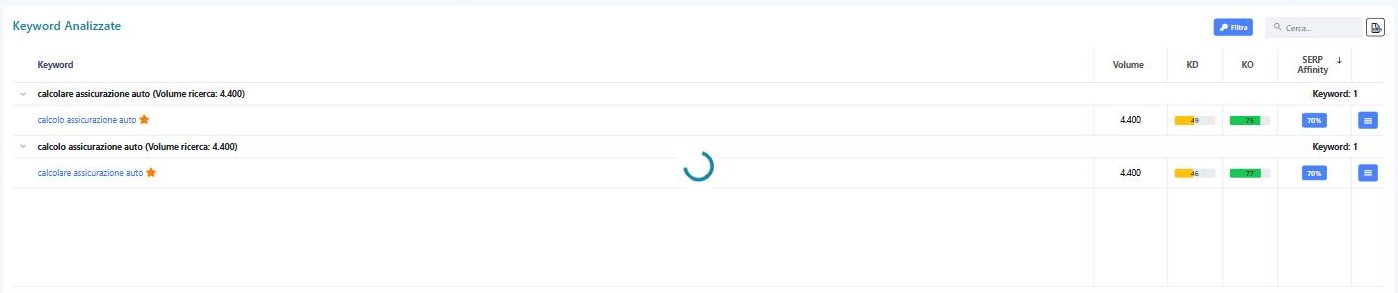
The most reliable criterion is to observe how Google already treats those searches. When two phrasings pull up mostly the same URLs, Google treats them as the same question, and a single piece of content can serve both. When the results diverge, Google expects different answers. SERP overlap matters more than any similarity between the words themselves. “Car insurance calculator” and “calculate car insurance” share most of their first page and call for one piece of content. “Wireless burglar alarm” and “burglar alarm tax deduction,” on the other hand, lead to results of a different nature, retailers and manufacturers on one side, tax guides on the other, and even the sellers that show up in both SERPs get there with separate pages.
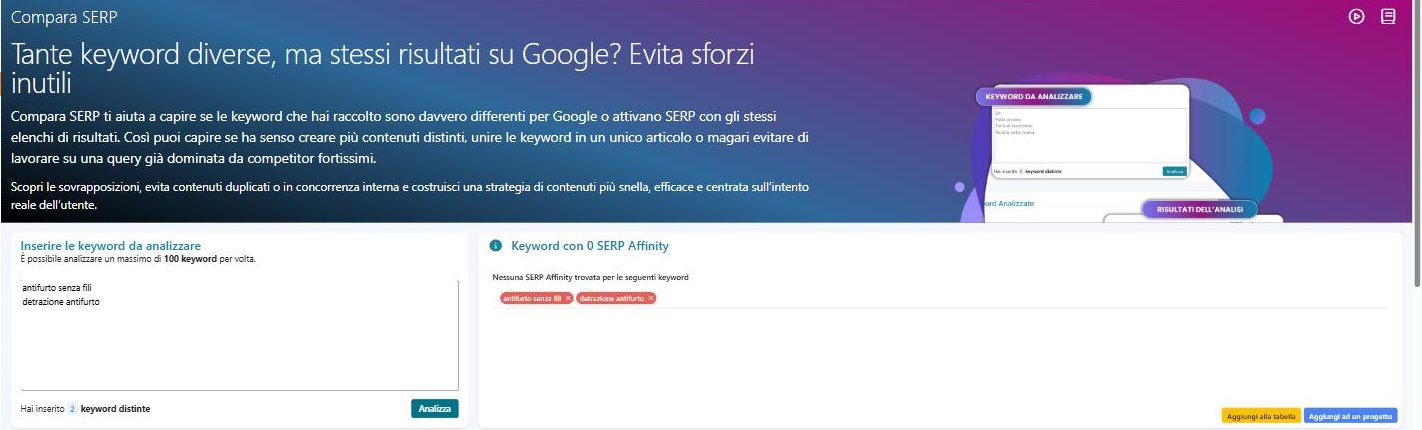
Comparing by hand works fine when you’re dealing with a handful of pairs. Compare SERP puts the first pages of two or more searches side by side and measures their overlap with SERP Affinity, the share of results they have in common. It counts the shared URLs without explaining why they’re shared, and when the value is low, look at which results differ and what type of page replaces them before you open a new one.
The same logic applies inside the page. The main keyword names the need you’re serving; the secondary keywords express it in other words, have similar SERPs, and don’t need to be repeated word for word. Phrasings that open up a sub-question belong in the page if the answer is there; otherwise, they become a separate, linked piece of content.
When this boundary is drawn poorly, two pieces of content on your site end up serving the same need, and Google alternates between them on the same queries. That’s cannibalization, and it usually stems from research that never established who covers what. In the opposite direction, a topic too broad for a single page breaks down into a topic cluster, a set of linked content pieces built around whatever ties the subject together, and there too, SERP overlap decides the boundaries of each node.
The decisions you make feed into an editorial plan that whoever writes the content can follow without redoing the reasoning: for each entry, the need it serves, the main keyword and secondary keywords, the stage of the decision, the URL to create or revise, and the priority with its rationale. Work order follows value, and search volume is just one signal among others: a need close to your offering, currently served by a page that answers poorly, can outrank a high-volume topic that requires content built from scratch. Alongside what you plan to do, keep track of the excluded needs and why (outside your offering, dominated by players you can’t compete with, already covered by another page): a documented reason keeps the same discussion from reopening a month later.
Fan-out widens the need, not the page count
The sub-searches an assistant pulls from a prompt look a lot like keywords, and the temptation to dedicate a page to each one is understandable. Google points in the opposite direction: a single page can cover multiple topics, and the system surfaces the relevant part of it. There’s no ideal length, and the signals that matter are still the ones in the SERP, because that’s where generative answers pull their sources from.
The expected answer criterion works here too. Sub-questions that expect the same answer help round out the content; those with their own SERP, verified the way you would check any other search, deserve dedicated content linked back to the first piece. Which subtopics to cover isn’t something you decide by gut feeling: Topic Explorer reads the pages already ranking for a keyword, pulls out the topics that recur across all of them, and shows you, for each one, the searches that make it up.
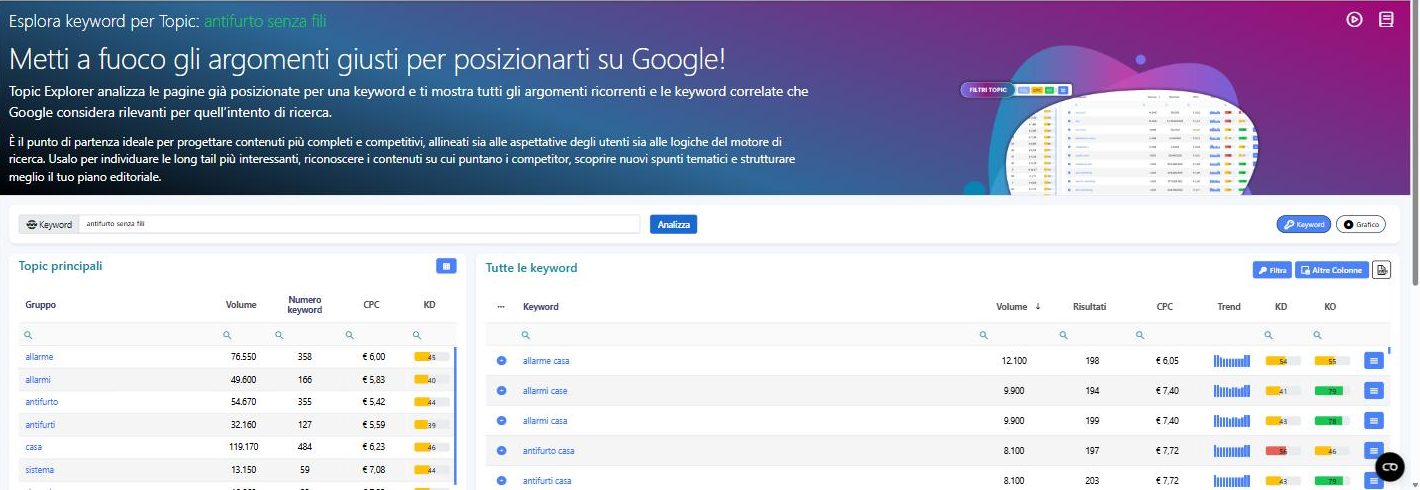
Rounding out a page, though, is different from padding it. An extra section makes sense when it answers a sub-question that genuinely exists, confirmed by real queries and their SERPs. Completeness multiplies your chances of being chosen without guaranteeing them: if you don’t appear among the results for those searches, you’re still left out.
After publishing, the queries you didn’t choose
Until the page goes live, everything you’ve worked out remains a hypothesis. You’ve decided which need it serves and what words express it, but it’s only once it enters the index that Google decides which searches to show it for. You’ll find that decision in Search Console, in the Performance report: each row is a search the page appeared for, along with the impressions it picked up and the average position it held. It’s the first concrete feedback on your keyword research.
The most common surprise is finding the page ranking for words that never appear in the text. Google inferred them by reading the content: its interpretation went beyond your original hypothesis, telling you that the way you covered the topic also addresses requests you hadn’t anticipated.
Unexpected queries can mean two opposite things. If they express the same need as the page, Google picked up on part of the demand your research had missed, and it’s worth reinforcing by developing that point further. If they’re about something else entirely, the page is being read outside the boundary you assigned it, and you need to either fix it or pair it with dedicated content. To figure out which case you’re dealing with, compare its SERP with that of the main keyword: if the results overlap, it’s the same need; if they diverge, it’s a different one.
Even the searches you expected and never got tell you something. If the page is indexed and picking up impressions on other searches, Google doesn’t consider it an answer to that phrasing, and the SERP helps explain why: it shows a different type of result than yours, or similar content that addresses that question with more precision.
Search Console data isn’t the only check. A shifting SERP, clicks that stop coming, and citations going to someone else all tell you whether a search still holds up, and each signal calls for a different fix.
- A SERP that changes under a piece of content that hasn’t. If the type of results reshuffles while your text stays put, Google has changed its mind about the expected answer, and you need to reread the intent of the whole group.
- Missing clicks at the same ranking position. The cause can be the snippet, the makeup of the SERP, or a misread intent, and you find it by opening the results and looking at what shows up above and next to your page.
- Citations going to someone else. For keywords tracked in a project, SEOZoom shows you whether an AI Overview appears, whether your site is among the sources and where, while the AI Prompt Tracker does the same work on assistant responses. When the sources chosen are different ones, there’s often a sub-question your page leaves uncovered.
Keyword research, then, reopens when these signals change, not on a fixed schedule. An unexpected query reopens a cluster, a reshuffled SERP asks you to reread the intent, a shift in what you offer puts the whole map of needs back into question.
The costliest mistakes
Almost every keyword research mistake comes from the same mix-up, treating the word as if it were the need, and the cost usually shows up months later, once the content is live and isn’t performing.
- Working the list from the top, by volume. At the top you usually find other brands, accessories, and different spellings of the same query. The cost is pages written for questions your site can’t answer, while the needs close to your offering go unaddressed.
- Mistaking an uncovered topic for an opportunity. A topic no competitor owns can be wide open, or it can have no demand at all, and the SERP tells you which: if nothing relevant shows up there, nobody’s searching for it. Skip that check and you write content nobody will ever look for.
- Targeting competitors’ brand names. Someone who types a company’s name wants that site, and rarely stops on yours. “X vs Y” and “alternatives to X” are a different story, because there’s a comparison you can serve there, and that’s the line separating brand keywords from non-brand ones.
- Doing keyword research once and calling it done. Search phrasing changes, SERPs reshuffle, competitors shift position, and a plan you never revisit ends up describing a market that no longer exists.
Tools, and how far you get without them
Almost every keyword research guide is published by someone selling the software the method requires, and this one is no exception. The honest way to write it is to tell you what each tool actually measures, how far you can get by hand, and where that road stops.
By hand, you can get pretty far. The suggestions Google shows as you type complete the term with words other people have used, the “People also ask” box grows as you open the questions, related searches at the bottom of the page offer variants, Search Console lists the queries your site already shows up for, and an AI assistant gives you hypotheses in seconds. This is real material, and it’s enough to understand a topic or find your first seeds.
The limit comes with scale. To know whether two phrasings should be served by the same page, you need to compare their SERPs, and the number of pairs to compare grows much faster than the number of phrasings, because every new row has to be checked against all the ones you already have. By hand, you can check a few dozen, picked by gut feeling. A manually built spreadsheet also only captures one day, while SERPs keep reshuffling and estimates keep changing, so comparing today’s situation with one from a few months back means starting over from scratch. You recognize the moment you need tools by the work itself: it’s when you notice you’re choosing what to check based on how much time you have, not on what you actually need.
SEOZoom’s keyword research tools start from the same idea: the keyword is a signal, there’s always a need behind it, and the work is done by intent, question, and topic. Each tool covers one step, from collection to tracking over time.
| What you need to know | Tool | What it gives you |
|---|---|---|
| How people search around a term | Keyword Infinity | Phrasings related to the seed keyword, with Groups for recurring terms, views for informational and commercial intent, and the “Questions, prepositions, and actions” tab |
| What users actually type | Keyword Suggest | Google’s and YouTube’s autocomplete suggestions starting from a keyword, with include and exclude filters |
| What questions people have | Question Explorer | The questions from “People also ask” boxes, with the number of keywords that trigger each one |
| What a page needs to cover | Topic Explorer | The recurring topics in pages already ranking for a keyword, each with the keywords that make it up |
| What revolves around a topic | Audience Interests | Related searches and interest clusters, arranged in a cell map |
| What niches exist in a given space | Explore Industry | The most relevant keywords for each topic, the most exploited subtopics, high-potential niches, and recurring questions |
| Where a site is underperforming | Opportunity Finder | The pages of a domain, yours or a competitor’s, with the largest estimated room for growth |
| How much weight a batch of phrasings carries | Analyze Keyword List | Volume, intent, SERP features, CPC, KD, KO, and trend for every row; phrasings the database doesn’t recognize end up under “Keywords not found” |
| Whether two phrasings belong on the same page | Compare SERP | The share of results the two SERPs have in common, expressed as SERP Affinity |
| How an assistant breaks down a need | AI Prompt Research | The sub-searches inferred from a prompt, grouped by area, for you to verify |
| Whether a site shows up in Google’s AI answers | AI Overview | The keywords where a domain appears in AI Overview boxes, how often, and in what form; if the site doesn’t appear, there’s no data to read |
| How to turn a list into a plan | Your Keyword Research | Saved lists, with total volume, intents, and seasonality, plus the “Suggest Editorial Plan” feature, which groups keywords by semantic similarity and intent |
| How to track the work over time | Projects | The site’s tracked keywords, updated every 48 hours, including ones the database didn’t previously know, measured as soon as the crawls process them |
The keywords an AI suggests to you
Asking ChatGPT or Gemini for a list of keywords for your industry has become the fastest way to get started. In seconds you get a neat, convincing list where every entry looks plausible: it sounds like something a person might actually search for.
None of those entries, though, is measured. The model doesn’t know how many people type each phrasing or what Google actually shows when you search it, and in its list, a phrase nobody uses looks exactly like one that thousands search for. There’s also a less obvious issue: the system generating those keywords is the same type of system that picks the searches when it answers your own customers, and its suggestions are just a guess about how people search and how the machine itself would search, with no evidence behind either guess.
An assistant is more useful when you ask it for the facets of a need instead of keywords, with a prompt like this:
Vendo [prodotto o servizio] a [tipo di cliente]. Elenca le domande che un cliente si fa dal primo interesse fino alla scelta del fornitore, scritte come le scriverebbe su Google. Per ciascuna indica che cosa sta cercando di decidere e quale obiezione potrebbe fermarlo.The questions that come out of this feed into your collection like any other source and go through the same checks: measurement, the SERP, and, for phrasings the database doesn’t recognize, tracking inside a project. The ones that hold up make it into your plan, the rest stay hypotheses, useful for thinking things through and too shaky to build decisions on.
Keywords remain the meeting point between the person searching and the one answering. Your job, today, is figuring out who’s writing them.


 Verified reviews on Trustpilot