Robots.txt: the server can answer before your instructions do
Before the robots.txt file, the server can answer first: here's what we found across 447 sites and how to check it on yours.
MediaWorld’s robots.txt runs 191 lines, with instructions for 49 different crawlers and two sections dedicated to AI alone: GPTBot, OAI-SearchBot, and ChatGPT-User are allowed to crawl the site, while other systems such as Amazonbot and MistralAI-User are blocked.
It’s a careful, detailed, precise file. And that’s not enough, because Cloudflare steps in before the file does, answering an anonymous request with its own verification page instead of those 191 lines. The lines spell out what MediaWorld asks AI crawlers to do, but a configuration no one outside can see decides which requests actually get served.
That’s what we found in our latest study, which analyzed the robots.txt file of 447 different sites to see how much of a site’s crawler access policy is actually written down in it. Less than you’d expect, and not just because of filters.
The public part of the access policy
In robots.txt you find the paths excluded from crawling and, bot by bot, the choices made about AI, and it’s the first place you look to understand how a site, yours or a competitor’s, treats Googlebot and GPTBot. Those instructions only count if they reach the crawler and if the crawler reads them exactly as the site wrote them.
Using data from the SEOZoom Observatory, we checked how often that actually happens. We started by picking a set of 15 high-volume searches, from car insurance to dentists, and analyzed the sample of 447 different sites that our database recorded in Google’s organic results. These include outlets like Corriere della Sera, portals like GialloZafferano and Tripadvisor, banks, insurance companies, and online stores like Decathlon and adidas.

We requested the robots.txt from each site twice, a few minutes apart: first identifying ourselves with the Chrome user-agent, then without saying who we were. A server that delivers the file in the first case and denies it in the second treats the two requests differently before anyone even reads the instructions. A parser aligned with Google’s then read the files we received the way Googlebot would.
We never identified ourselves as Googlebot or GPTBot, so the data doesn’t show what a specific crawler receives. It shows where the file alone isn’t enough to know. Numbers, charts, and methodology are in the full study, which is also where the slides in this article come from.
The server answers before the file does
Aranzulla’s robots.txt has just one line, the sitemap address, and not a single disallow. The server delivers it to Chrome but responds with 403, access denied, to the anonymous request. Decathlon, Randstad, and Eataly behave the same way with files that allow crawling, while Allianz, adidas, and ASICS deny the file even to the Chrome request. In total, that’s 64 out of 447 sites, and in each case the server answers before robots.txt can say anything at all.
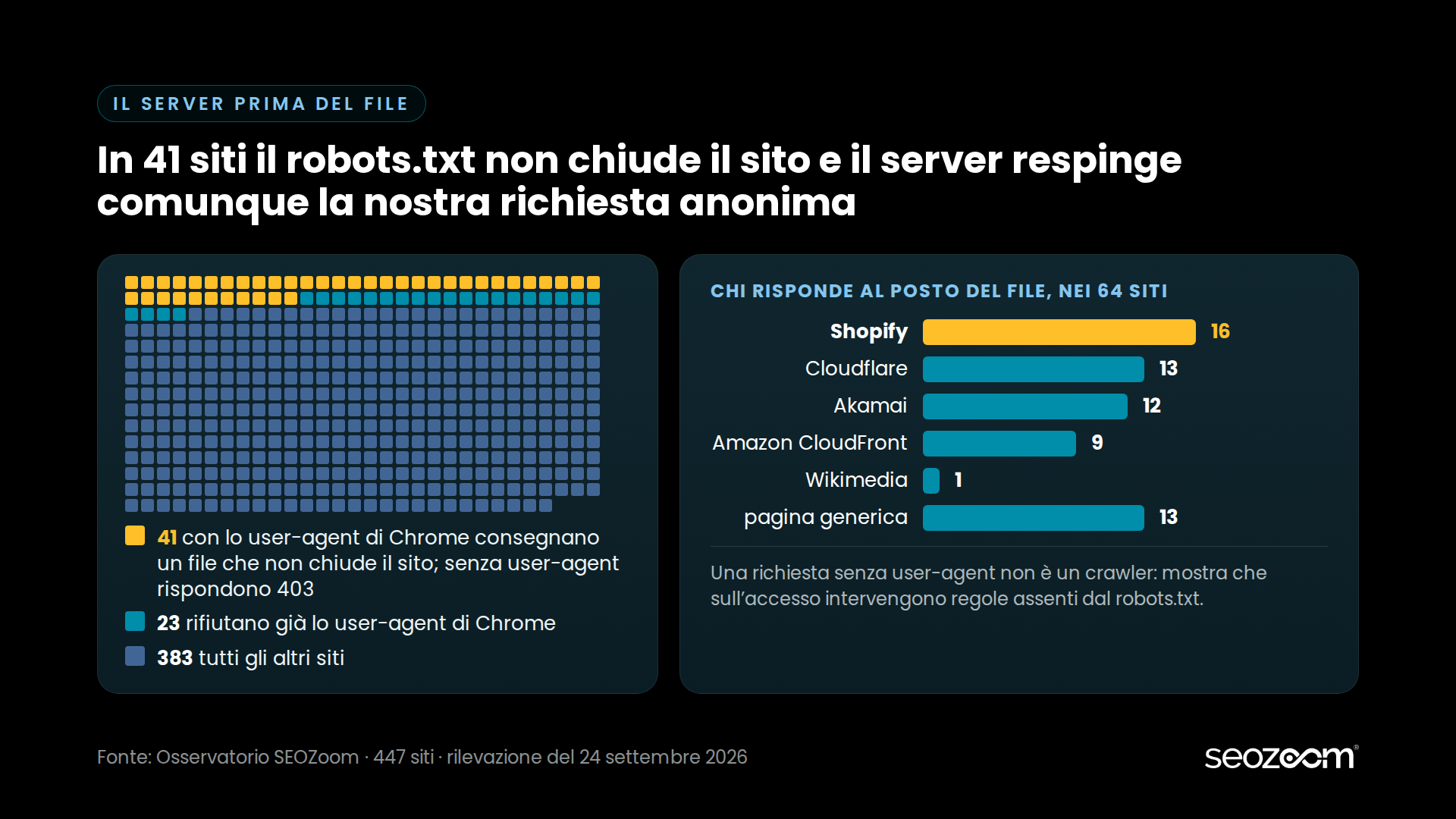
The rejection page usually carries the signature of whoever answered. Cloudflare shows up on 13 sites, MediaWorld included, Akamai on 12, Amazon CloudFront on 9, Wikimedia on Wikipedia, and sixteen stores return the exact same page, byte for byte, fifteen of which say they run on Shopify. In front of those sites sits a service that filters automated traffic, and part of the access rules live in its configuration, which isn’t public. The other thirteen denials carry no signature and may come from the server itself.
For Google, a 403 on robots.txt removes every restriction
Googlebot requests robots.txt before crawling a site and adjusts its behavior based on the response. A 4xx on the file, 403 included, counts for Google as a file that doesn’t exist, meaning no restrictions at all. A filter that denies robots.txt to Googlebot doesn’t stop it, it strips away the instructions, and Googlebot then treats even the areas the file meant to keep off-limits as allowed.
A 5xx error produces the opposite effect. For the first 12 hours, Google pauses crawling and keeps requesting the file, then for 30 days it applies the last valid version it has on record, or no restrictions if it doesn’t have one. After that month, if the site is reachable, Google treats the file as if it doesn’t exist, while broader availability issues make it stop crawling altogether.
SEOZoom’s SEO Spider ran into this gap between file and server on Subito’s homepage, with a Status Code of 403 and Blocked by Robots set to NO. The robots.txt allowed the page, and it was the server that turned the Spider away. That same gap, when it hits Googlebot, matters more than anything written in the file. A page that returns 403 to Googlebot doesn’t get indexed by Google, and if it was already indexed, it drops out, the same as with other 4xx status codes. Once excluded from the index, it also disappears from AI Overviews and AI Mode, which draw on the index, and from the traditional search results that AI assistants rely on when looking for live sources.
Online stores trigger the filter more often
The server rejected the robots.txt request in 33 of the 94 online stores in the sample, 35%, compared with 8% of other sites, and even excluding Shopify stores the share stays at 22%. The adidas story published by Akamai explains why adidas put a filter in front of its catalog, against bots that snap up limited editions on launch days and others that copy product pages, prices, and availability. Googlebot and OAI-SearchBot are automated programs too, and a filter tuned against scrapers has to recognize them to let them through. For a store, setting up that filter is as much a part of technical SEO as the robots.txt file.
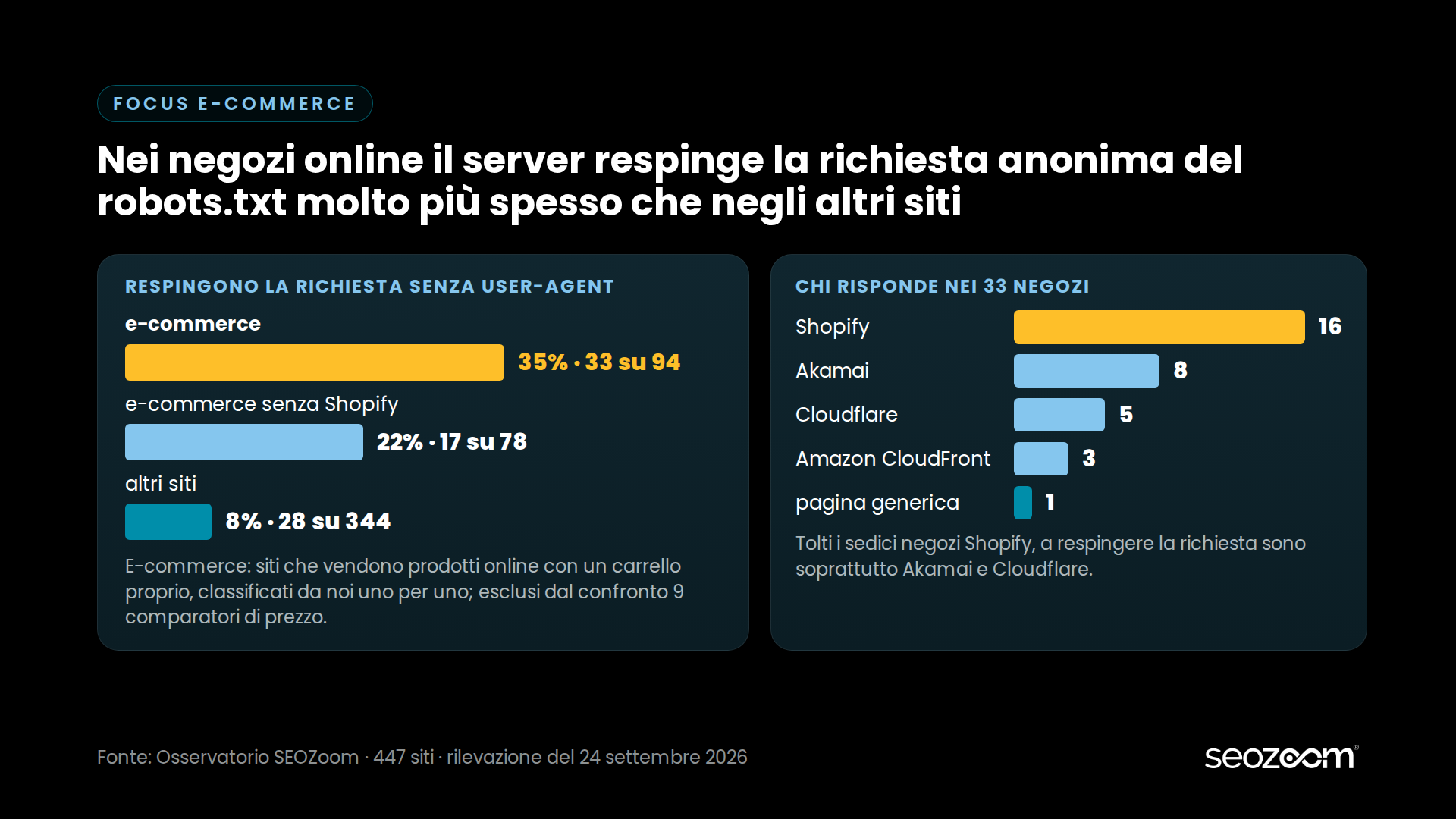
With Shopify the relationship between the two is even clearer. Ten of the sixteen stores in the sample use the platform’s standard file and six have written their own, but all of them answered the anonymous request with the same page. A merchant who rewrites the robots.txt changes the instructions, not that response.
Rules apply group by group
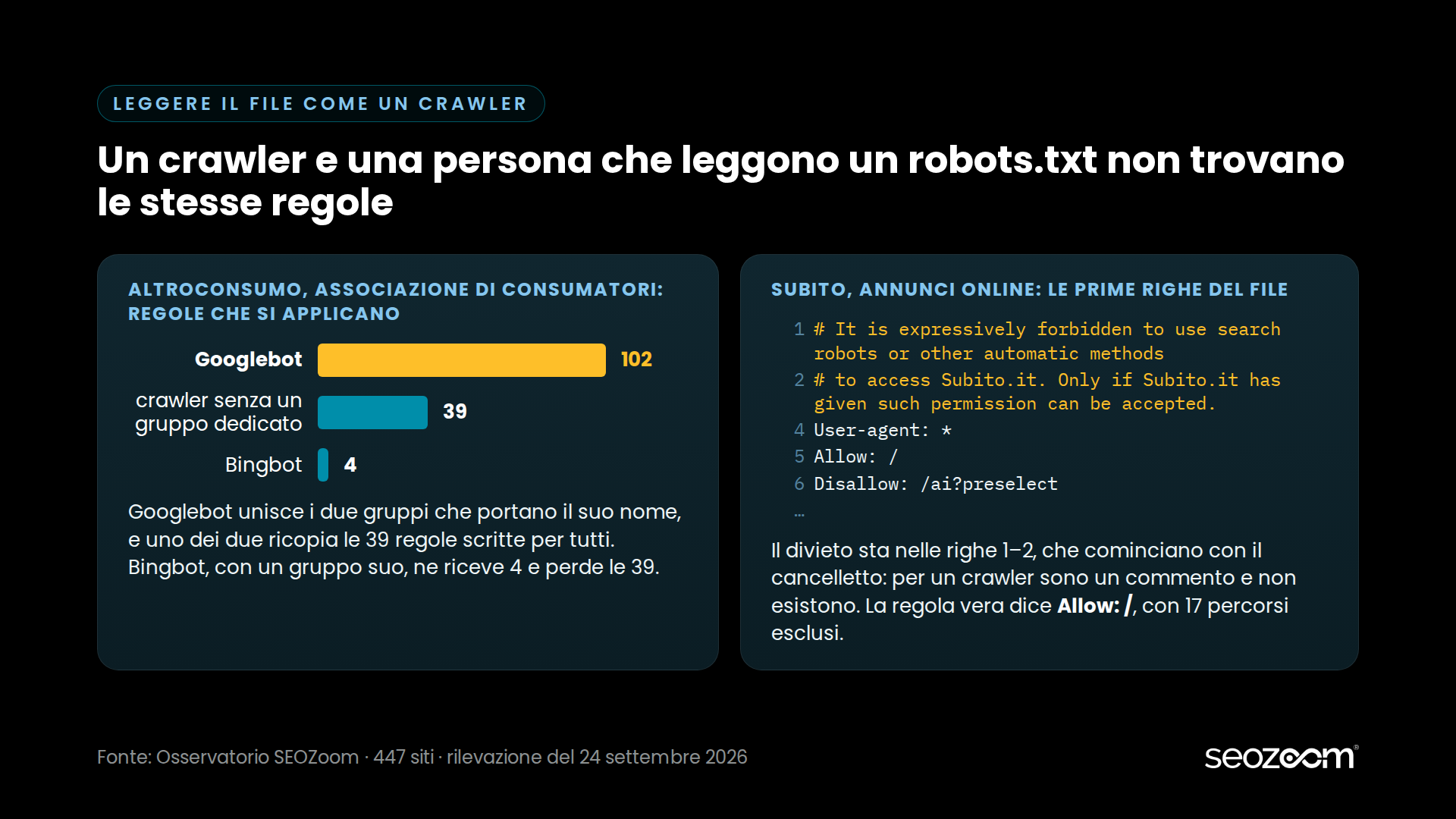
A crawler doesn’t apply robots.txt in the order it’s written. Googlebot looks for the groups that carry its name, merges them, and applies only those, following the wildcard group only if its name doesn’t appear anywhere. Consecutive User-agent lines form a single group, and lines starting with a hash sign are comments it skips. A bot that gets its own dedicated group stops receiving the general rules.
We learned this the hard way. The first version of our parser read the Volotea and Skyscanner files line by line, assigned rules meant for an entire group to a single bot, and found anomalies that didn’t exist. They disappeared once the parser started reasoning the way Google’s does. A manual check, or a tool that doesn’t follow the same logic, makes the same mistake.
On Altroconsumo, that difference changes the diagnosis. The site’s 39 general rules block, among other things, internal search, registration, and login. For Bingbot the site wrote a group with four rules, covering JavaScript, CSS, and two technical paths, and with that group Bingbot lost all 39 exclusions, so much so that /cerca and /secure/login/ remain open to it. Googlebot has two groups, one with the same rules on JavaScript and CSS and one, dated in the comments March 26, 2024, that copies the 39 general rules and adds 61 more. Every line is correct, and a group written for two types of resources opened pages to Bing that the general rules close off. Every time you give a bot its own instructions, GPTBot included, the general exclusions that should also apply to it need to be copied into its group.
Subito’s file opens with a prohibition a bot doesn’t read. The first two lines forbid robots and automated programs without authorization, but they start with a hash sign, and Googlebot skips them to apply what follows, “User-agent: *” and “Allow: /” with seventeen excluded paths. A person opening the file sees a prohibition that doesn’t exist for Googlebot.
Each name decides only for itself
In 212 of 388 files, more than half, there’s only the wildcard group, and Googlebot, GPTBot, and every other bot receive the same instructions. The 81 files that name at least one AI-related bot cluster mostly among the strongest domains, appearing in 49% of sites with Zoom Authority between 70 and 100, the metric SEOZoom uses to measure a domain’s weight, versus 8% of those below 40.
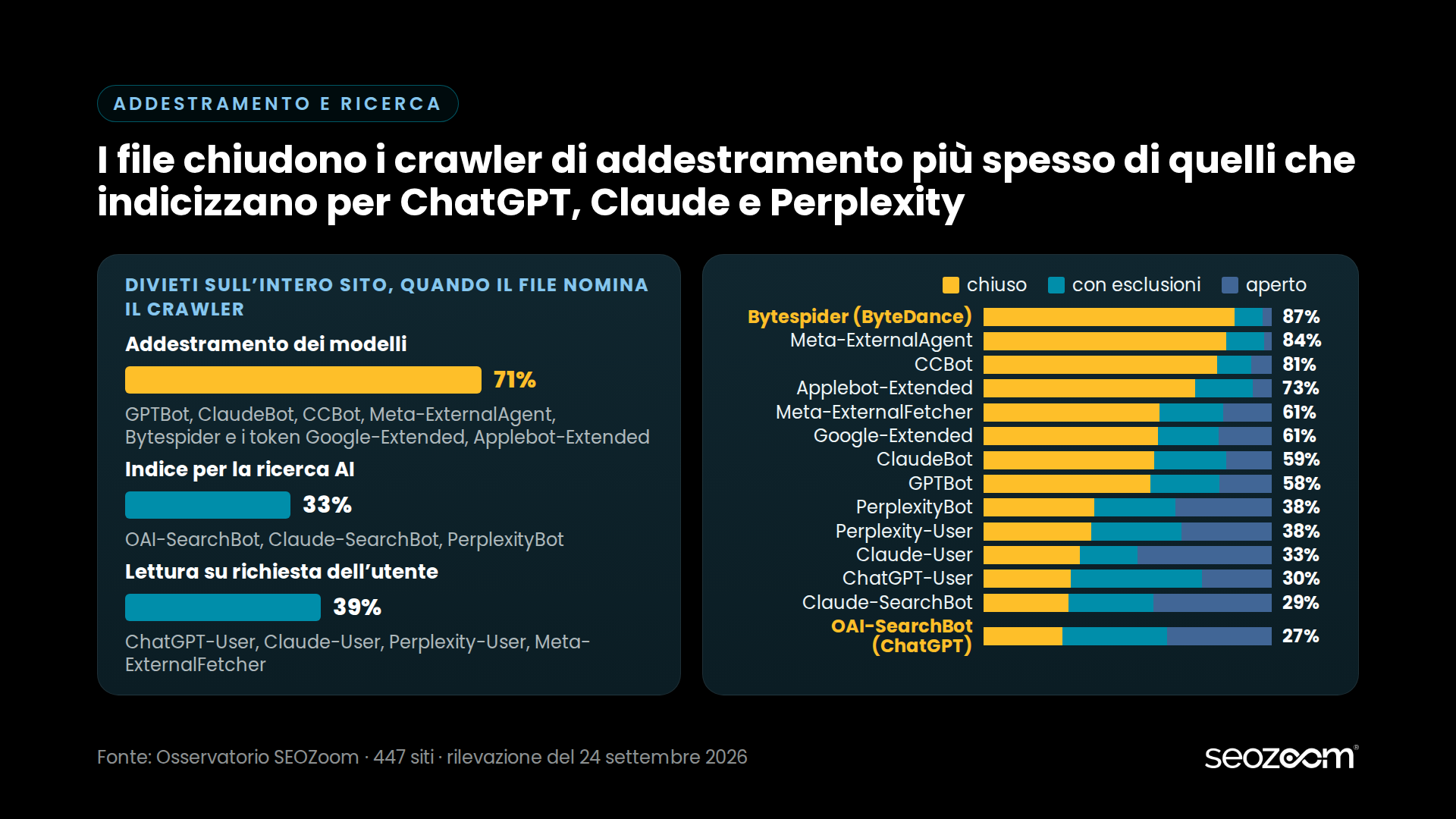
Those files distinguish bots by function. GPTBot, ClaudeBot, and CCBot collect text to train models, OAI-SearchBot and PerplexityBot index pages for assistant search, and a site-wide ban hits 71% of mentions of training bots versus 33% of search bots. With Google the pattern repeats. Twenty-three files block Google-Extended, the name a site uses to request that its content not be used to train Gemini or supply it with material in its apps, and none block Googlebot. Google-Extended doesn’t affect Search, and so it doesn’t affect AI Overview or AI Mode either.
OpenAI keeps separate the settings for GPTBot, which collects text for training, and OAI-SearchBot, which brings sites into ChatGPT search. Seven of the 28 files that name both block the first site-wide while leaving the second open or applying its own exclusions to it: Corriere della Sera, Tripadvisor, Altroconsumo, Forbes, fly-go, Migliormaterasso, and Mioassicuratore. Altroconsumo even spells it out in comments, “Allow AI search and agent use” above OAI-SearchBot and “Disallow AI training data collection” above GPTBot.
Another twenty-two files give GPTBot a group and give OAI-SearchBot none. ChatGPT’s search crawler then receives the wildcard rules, whatever they say, and a different choice for search requires a group under its own name, a change OpenAI picks up in about 24 hours. The same thing happens with copied lists. In three files in the sample, the list of excluded bots matches an old version of ai.robots.txt, the list of names published on GitHub, and it’s missing Claude-SearchBot and Claude-User, which came later. Rules written for ClaudeBot don’t cover them.
ChatGPT-User is a case of its own. It opens pages at a user’s request, without crawling the web, and OpenAI warns that robots.txt rules may not apply to it. A “Disallow: /” written for ChatGPT-User remains a preference, one only the server can enforce.
Where to look on your own site
On your own site, the first check is a crawl with SEOZoom’s SEO Spider. In the Response Codes report you’ll find, for every URL, the code returned by the server in the Status Code column, and Blocked by Robots if the robots.txt file stopped the crawl. A 403 with Blocked by Robots set to NO is Subito’s case: a page the file allows and the server rejects.
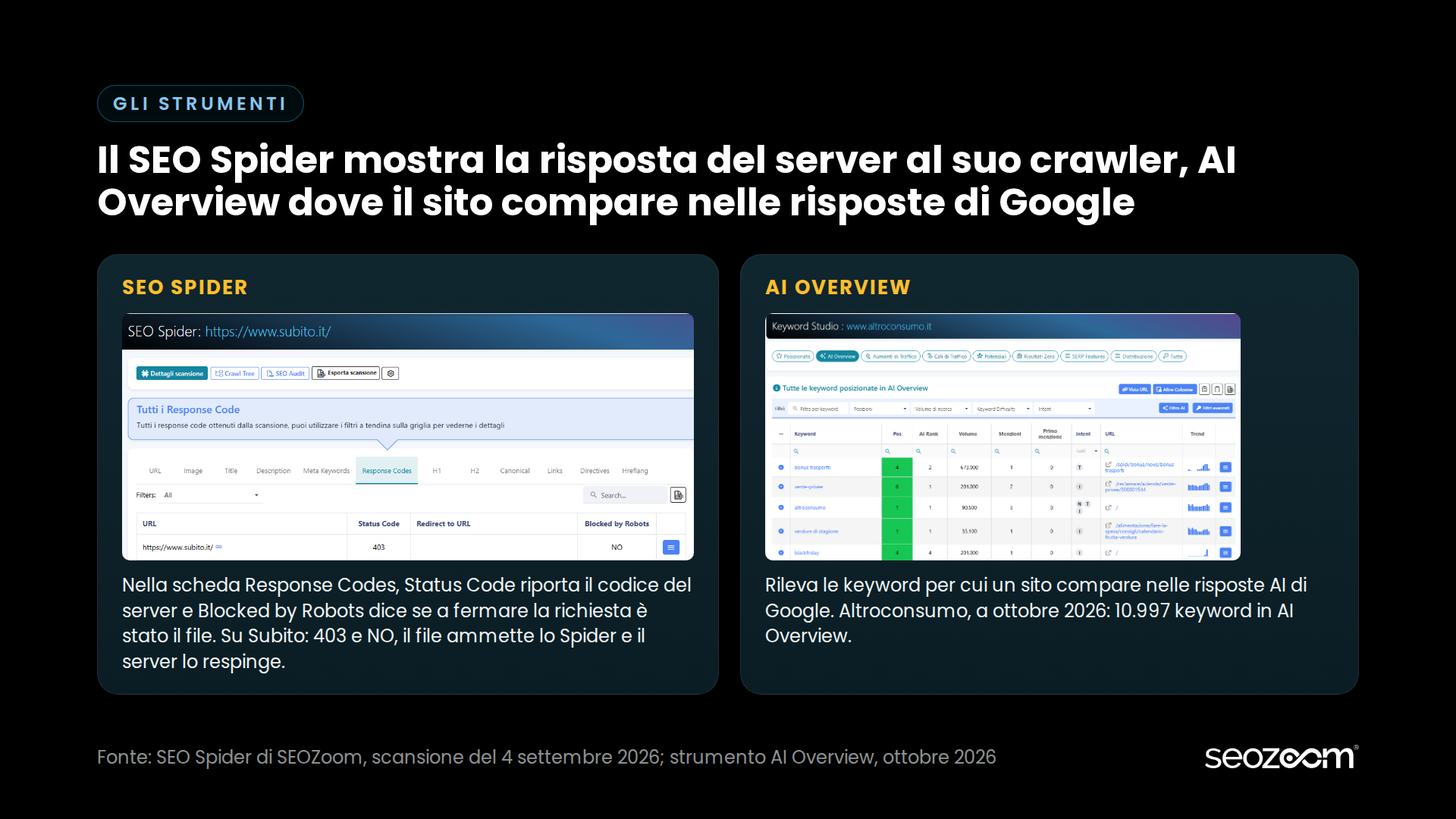
You can see what Googlebot actually received in Search Console. The robots.txt report shows the version of the file Google downloaded and the outcome of the request, while Crawl Stats breaks down requests by server response. The URL Inspection tool reports the last crawl of the page, with one field showing whether robots.txt allowed it and another showing whether the server delivered it. The live test in the same tool, though, runs on a different crawler, Google-InspectionTool, which a filter can treat differently from Googlebot. For GPTBot, OAI-SearchBot, and other AI crawlers, the proof is in the server logs and those of your protection service, where the IP addresses Google and OpenAI publish separate genuine visits from ones that just borrow the name.
After a change, check presence alongside access. SEOZoom’s AI Overview tool lists the keywords for which your site shows up in Google’s AI answers, and AI Prompt Tracker tracks citations in AI Mode, ChatGPT, and Gemini for the prompts you monitor. A reading before and one after will tell you if anything moved.
A badly written rule gets fixed in robots.txt. A block gets fixed where it’s enforced, on the server or in the panel of your CDN, firewall, or platform, and before you touch anything you need to know which of the two is stopping the bot. The study also covers what’s left out here: robots.txt files partly written by Cloudflare, a store that explains its stance on AI in the comments, and files that announce llms.txt with fields that bots simply ignore.


 Verified reviews on Trustpilot